
Genesis VIN Decoder – Check Vehicle Details by VIN
Checking a used Genesis? Start with a free Genesis VIN Decoder. Confirm the basics like specs, year, model, engine, or trim at no cost! Then get the full vehicle history details, and see accidents, mileage, liens, and recall records.
What is the Genesis VIN Decoder?
A Genesis VIN decoder is a tool that reads the 17-digit Vehicle Identification Number (VIN) and reveals the vehicle’s original factory specifications. Every Genesis VIN contains encoded details about the vehicle’s engine, trim, drivetrain, body style, model year, and production plant.
A Genesis VIN number (Vehicle Identification Number) is a unique code assigned to a vehicle during manufacturing, typically consisting of 17 characters. This standardized format has been required in the U.S. since the 1981 model year. The VIN contains important details like the manufacturer identifier and vehicle attributes.
For older or collector vehicles, VINs may be shorter and less standardized, ranging from 5 to 14 characters. PremiumVIN can decode both modern and classic-style VINs, so you simply enter the VIN and let the decoder do the work.
Information You Can Get From a Genesis VIN Number
A Genesis VIN decoder helps reveal important factory details about the vehicle using the 17-digit VIN number. Each VIN contains information that identifies the vehicle’s manufacturer, model, engine type, trim level, production year, and factory build details.
Manufacturer and Model Information
Manufacturer Details
Verify that the VIN belongs to Genesis and confirm manufacturer information under Hyundai Motor Group.
Model Information
Identify the exact Genesis model, such as G70, G80, G90, GV60, GV70, GV80, or Electrified variants.
Engine and Transmission Specifications
Engine Specifications
View engine type, displacement, horsepower, and fuel type (e.g., 2.5L Turbo, 3.3L Twin-Turbo V6, 3.5L Twin-Turbo V6, 5.0L V8, or electric powertrain).
Transmission Details
Verify the original transmission configuration (8-speed automatic, 6-speed manual, or EV single-speed reduction gear).
Drivetrain and Body Style
Drivetrain
Check whether the vehicle is RWD, AWD, or HTRAC (Genesis’s proprietary all-wheel-drive system).
Body Style
Confirm the body configuration (sedan, SUV, or crossover – G70, G80, G90, GV60, GV70, GV80).
Production Details
Model Year
Verify the production year encoded in the VIN.
Assembly Plant
See where the vehicle was manufactured (e.g., Ulsan, Asan, or Yeonggwang, South Korea).
Factory Specifications
Review original manufacturer build details.
How to Decode a Genesis VIN Number
Decoding your Genesis VIN is simple and takes less than a minute.

Step 1: Find Your VIN
Find the 17-digit VIN number on the vehicle dashboard, driver-side door jamb, or registration documents.

Step 2: Enter the VIN
Type or paste the full Genesis VIN into the decoder tool above.

Step 3: Access Factory Specifications
Instantly view the vehicle's factory specifications, including engine, trim, transmission, and model year.
How to Read a Genesis VIN Number
Most modern vehicles, including Genesis models sold for road use in the U.S., follow a standardized 17-character VIN format. That format is commonly described in three parts: WMI (1st–3rd characters), VDS (4th–9th characters), and VIS (10th–17th characters).
You don’t have to memorize it, but understanding the “sections” helps you make sense of what a Genesis VIN decoder is doing.
WMI (World Manufacturer Identifier)
The WMI (World Manufacturer Identifier) is the first 3 characters of the VIN. It’s designed to identify the manufacturer and region in a standardized way. For Genesis, you’ll often see WMIs connected to Hyundai/Genesis manufacturing groups, and they point to the maker category and origin.
WMI Character Meaning
Here’s a simple example using a Genesis-related WMI shown in public WMI lists:
- K = Geographic region code (used for South Korea in WMI systems)
- M = Manufacturer group identifier (commonly used under Hyundai/Genesis WMIs)
- T / U = Vehicle type category used in certain Genesis WMIs (examples include KMT and KMU)
(Small note: WMIs vary by vehicle type and market.)
VDS (Vehicle Descriptor Section)
The VDS (Vehicle Descriptor Section) is characters 4 through 9. This part describes the vehicle in a more detailed way, like model line, body style, restraint system, and engine-related descriptors, depending on how the manufacturer encodes it. It also includes the check digit at position 9 in the U.S. system, which helps validate that a VIN isn’t mistyped or fake.
VDS Character Meaning
- Characters 4–8 = Vehicle attributes chosen by the manufacturer (model/engine/body descriptors)
- Character 9 = Check digit used to validate the VIN (U.S. VIN standard practice)
Because VDS coding can vary by brand and model, an online VIN number decoder tool like PremiumVIN is the easiest way to translate it without guessing.
VIS (Vehicle Identifier Section)
The VIS (Vehicle Identifier Section) is characters 10 through 17. This section commonly includes the model year code, assembly plant code, and a serial sequence number. In the standardized North American system, the 10th character is used for model year.
VIS Character Meaning
- Character 10 = Model year code (standard for 1981+ vehicles in North America)
- Character 11 = Plant/assembly code (manufacturer-defined within the standard)
- Characters 12–17 = Serial/production sequence portion
Where to Find the Genesis Vehicle Identification Number?
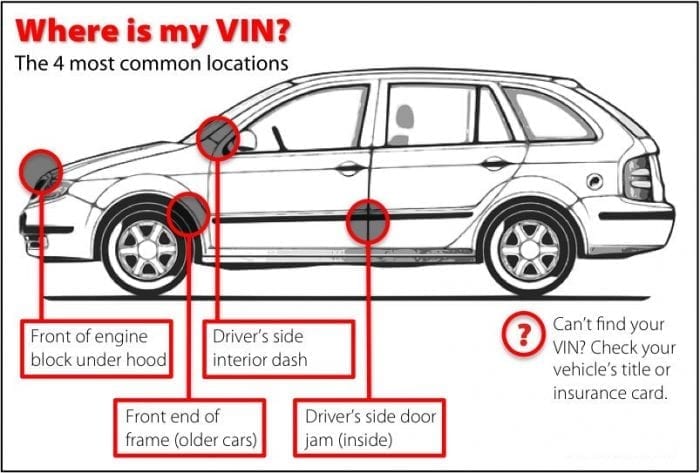
The VIN is usually in common locations that manufacturers and regulators expect. Genesis also points to typical VIN locations for recall checking. You may see the Genesis’ VIN in these areas:
Dashboard
Look through the windshield at the lower corner of the dashboard on the driver’s side. If the light hits it right, you’ll see the VIN plate.
Driver-side door jamb sticker
Open the driver’s door and check the label area near where the door latches. It’s often the easiest spot to read cleanly.
Vehicle documents
Your registration and insurance documents usually show the VIN too. That’s useful when you don’t have the car right in front of you.
Under the hood
Some Genesis models also have a VIN stamp or label in the engine bay area. It’s not always the first place to look, but it can help confirm consistency.
Supported Genesis Models
You’ll see some common Genesis models below. Still, you can run a Genesis VIN lookup tool for basically any trim and year you have in front of you.
G80
G90
G70
Gv80
Gv70
Electrified G80
Electrified Gv70
Gv60
Why Users Trust Our Genesis VIN Decoder
A Genesis VIN check should feel reassuring, not confusing. That’s why users come back to our Genesis VIN decoder. It combines structured VIN decoding with vehicle history insights, so decisions are based on facts instead of assumptions.
Most comprehensive database coverage
Our Genesis VIN decoder is built to pull together common history categories in one place, so you’re not opening ten tabs and trying to connect dots yourself. For buyers and collectors, that’s the difference between feeling confident and feeling unsure.
24/7 customer support
VIN questions pop up at any time. Buyers message you at night. Dealers call in the morning. Collectors work on weekends. Having support available helps people move forward instead of getting stuck and abandoning the purchase or the research.
High accuracy, cross-checked results
A VIN has structure for a reason: it’s meant to be validated and consistently interpreted. We use those structural rules and cross-check with other trusted sources to reduce obvious mistakes.
No hidden fees or subscriptions
People hate surprises, especially with money stuff. The pricing should feel clear and direct, so you can choose a quick check or a full report without worrying that you clicked into a long-term plan by accident.
Daily data updates
Car records change. New listings appear, recalls open and close, and status can be updated over time. We aim to refresh and process data regularly so the report doesn’t feel outdated the moment you download it. It’s not about being perfect; it’s about staying relevant for real decisions.
Downloadable PDF
A report is most useful when you can save it, send it, or keep it for later. A downloadable PDF makes the report portable, especially if you’re comparing multiple Genesis listings or storing records for a collection.
Beyond Specs, Get the Genesis Premium History Report?
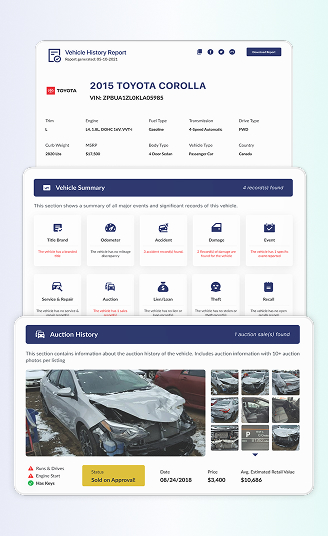
A Genesis VIN decoder tool can confirm what the vehicle is. A build sheet or window sticker explains how it was equipped. A full Genesis vehicle history report shows what the car has been through. Each tool answers a different question, and using them together gives the clearest picture.
Below is what PremiumVIN typically lays out in a Genesis report through VIN check:
Vehicle Specifications
This part is the “what it is” section. It uses the VIN structure to describe the Genesis vehicle’s core identity, so you can match what you’re seeing in real life with what the vehicle is recorded as.
Year, Make, Model
This shows the recorded year and model line tied to the VIN, which helps you confirm the car is truly a Genesis G70, G80, G90, GV70, or GV80, not something mislabeled in a listing.
Trim
Trim matters more than people admit. This section helps clarify which version the vehicle is recorded as, so you’re not paying “top trim money” for a base trim with fancy photos.
Engine and Drivetrain
If available, you may see the engine type and drivetrain hints connected to the vehicle descriptor section, which is useful when a seller is being a little too relaxed with details.
Transmission and Fuel Type
This can help confirm whether the Genesis is listed with the transmission and fuel setup that matches records, especially useful for cross-checking imported vehicles and reposted listings.
Auction History
Auction data can show up even when a seller doesn’t mention it. This section helps collectors and buyers understand if the Genesis appeared in auction channels.
Auction Date and Location
If auction records exist, the date and location can help you place the event and compare it against ownership timelines and listing history.
Sale Price
A reported sale price can give context about value swings, especially if the current asking price is wildly different from what the car moved for before.
Condition Notes
Auction condition notes can mention damage categories. They’re not always detailed, but they can point you toward the right questions.
Number of Photos Taken at Auction
Photo counts can hint at documentation depth. More photos often mean more angles to evaluate, which matters when you’re trying to verify a condition.
Sales History
Sales history is about spotting patterns, such as how often it was listed, how it was described, and whether it keeps bouncing around.
Number of Times Listed
Multiple listings over time can be totally normal, or it can be a sign that the car is hard to sell. Context matters, but this helps you see the pattern.
Condition at Each Listing
If prior listing condition details appear, they can help you understand whether the Genesis got better, worse, or just got new photos and new excuses.
Photos from Past Listings
When available, older photos can help you compare the condition over time. It’s surprising how often “minor cosmetic issue” was actually there two years ago, too.
Title Check
Title branding is one of those topics nobody wants to deal with, until it’s too late. This section looks for title-related red flags that can affect value, registration, insurance, and peace of mind.
Salvage
A salvage brand usually means the vehicle was declared a total loss by an insurer at some point.
Rebuilt
Rebuilt can mean the car was repaired and later approved for road use after being salvaged. This matters for collectors and buyers because of the repair quality.
Lemon
A lemon brand can appear when a vehicle is repurchased or branded under lemon law processes. It’s not gossip, it’s paperwork, and paperwork tends to win arguments.
Junk / Non-Repairable
If records indicate a non-repairable or junk classification, that’s a serious signal that the vehicle may not be legally drivable, even if it looks fine in photos.
Ownership History
If you’re buying a Genesis for the long run, ownership patterns matter. This section helps you understand how the vehicle moved through owners and locations, when that information is available in recorded sources.
Owner Count
This section will show you how many owners are reported. A higher count isn’t always a disaster, but it can explain why a car has patchy maintenance or mixed-condition listings.
Ownership Timeline
A timeline view can show approximate periods of ownership. It’s useful for checking whether the seller’s story lines up with the general ownership flow.
Vehicle Use Type
The vehicle history records will show you the available records of personal, fleet, rental, or other use types. That can matter because a “gently owned” claim hits different if the car lived a harder life.
Registration Locations
This helps show where the vehicle has been registered when those records exist, which is helpful for understanding region-based wear patterns and paperwork consistency.
Mileage History
Mileage is one of the easiest things to misunderstand and one of the hardest things to fix once it’s wrong. This section focuses on mileage patterns pulled from multiple reporting points when available.
Mileage History from Multiple Sources
Mileage may appear across different record moments. Seeing several points over time is better than seeing just one number typed into a listing.
Rollback Detection and Alerts
If the mileage pattern appears inconsistent, the report may surface signs that deserve attention. It’s not a final verdict, but it’s a “slow down and double-check” kind of warning.
Annual Usage Patterns
This can help you tell if the Genesis was driven each year or sat for long periods. Both can be fine, but both can also come with different risks.
Lien/Loan Check
Nobody wants to buy a car and then find out someone else still has a financial claim on it. This section is about spotting lien or loan-related records when available.
Lien Record Identification
If a lien record appears, it may indicate an outstanding claim or a past financing record connected to the vehicle, depending on reporting and updates over time.
Dates and Locations (When Available)
When provided, the report may show dates and jurisdictions tied to lien-related records, which can help you understand whether it’s current, old, or unresolved.
Verified Sources
PremiumVIN reports don’t just “guess.” They reference structured data sources where available, and that’s the difference between a real check and internet noise.
Accident Records
Accidents aren’t always deal-breakers. But hiding them is. This part summarizes accident-related entries that show up in available records.
Number of Accidents Reported
This can list how many accident events are recorded. Even one is worth reviewing, because severity matters more than count.
Date of Reported Accidents
Dates help you place the incident in the car’s life. A recent accident can mean recent repairs, while an older one may have long-term wear effects.
Reported Accident Location
Location can help you cross-check the event and understand conditions around it, especially if the vehicle moved states right after.
Damage History
Damage can be cosmetic, structural, environmental, or all three. This section focuses on damage categories that buyers and collectors tend to care about.
Flood Damage
Flood history is a big one because water can affect electronics and interior systems in sneaky ways. If a flood shows up, ask for deeper proof and inspections.
Fire Damage
Fire exposure can lead to wiring issues and long-term reliability problems. If records mention it, treat it seriously, even if the car looks clean.
Hail Damage
Hail can leave widespread dents that get repaired unevenly. If it appears, you’ll want to look closely at body panels and paint consistency.
Theft Records
This is the part, it’s about checking whether the vehicle appears in theft-related records where available.
Stolen Status Check
If the report indicates a stolen status record, that’s a stop-and-verify moment. Don’t argue with the listing; verify it properly.
Recorded Theft Incidents
Some records may show prior theft incidents even if the vehicle was recovered. That can matter for documentation and resale, not just fear.
Who Should Use the Genesis VIN Lookup Tool?
A Genesis VIN lookup is for anyone who wants clean facts about a car, without relying on a seller’s memory (or a dealership’s story). If you’re buying, selling, collecting, or just trying to understand what your Genesis really is, a Genesis VIN decoder helps you check the basics fast, then go deeper when you need to.
Buying a used Genesis can feel easy until it isn’t. A quick Genesis VIN check helps you screen the car before you waste time, money, and energy. It’s not about being paranoid. It’s about being calm, prepared, and a little smarter than the average listing.
Identify hidden damages before purchase
A Genesis can look perfect in photos while still having recorded issues. A Genesis vehicle history report helps you spot red flags early, so you don’t get surprised after you pay.
Review flood or fire indicators
Environmental damage can be sneaky, especially with electronics. If it’s reported, you want that in front of you early.
Feel confident before you negotiate
Even if you still buy the car, having facts from a Premium Genesis VIN decoder gives you a stronger, calmer position to negotiate.
Selling a Genesis is easier when you can answer questions quickly and clearly. A Genesis VIN lookup helps you back up your listing and reduce back-and-forth. Because buyers trust you more when you show you’ve done the homework.
Verify a vehicle’s value
When you know the car’s recorded history and specs, you can price it more fairly and explain the price without sounding defensive.
Support trade-in conversations
If you’re a dealer, having a clean car history report summary helps you talk through condition and history without guessing.
Explain prior repairs more confidently
If accidents or damage records are reported, you can address them directly instead of being caught off guard.
Collectors and enthusiasts care about details that other people ignore. A Genesis VIN decoder helps you keep your records clean, compare builds, and verify what you’re looking at. And if you’re buying something rare or just “rare-ish,” it’s a smart habit.
Keep a clean archive for your Genesis
A VIN-based history record helps you store the car’s identity details in a way that’s easy to revisit later.
Compare two Genesis cars side-by-side
Running a Genesis VIN lookup tool on multiple cars makes it easier to compare what matters, not just paint and photos.
Support restoration or long-term ownership plans
Specs and history can guide what parts you order and what service choices make sense.
Case Study: Why Decoding a Genesis VIN Number Is Crucial
A Genesis VIN decoder tool doesn’t just satisfy curiosity. It helps you avoid expensive mistakes, especially when you’re dealing with used cars, collector buys, or cross-border paperwork.
Sample Report: KMUMADTB6NU060493
Initial Impression
- Charlotte was looking at a 2022 Genesis GV70 that seemed straightforward. Nice spec on paper, modern Genesis, nothing obviously strange at first glance. So she did what careful buyers do and ran a Genesis VIN decoder report before getting emotionally attached.
Critical Findings
- 1 damage record showed up in the summary.
- 1 lien/loan record was reported, which can matter a lot depending on whether it’s been cleared.
- Ownership history showed two owners: first in SC (owned about 6 months), then in CT from 09/2022 to “Present.” Quick first ownership can be totally normal, but it’s worth noticing.
- A sales listing record appeared dated 08/01/2022 in CT with a listed price of 52,976 and dealer listing details.
Outcome
- Instead of walking away instantly, Charlotte got smarter with her next steps. She didn’t argue with the listing or assume the worst. She used the report to guide her in asking questions to the seller.
Lessons Learned
- A Genesis VIN lookup can tell you what the car is. A full Genesis history report helps you see what the car has been through
- And in Charlotte’s case, the biggest value wasn’t “finding a horror story.” It was catching the kind of mixed or confusing signals that need verification before money changes hands.
Free Genesis VIN Decoder vs Full Vehicle History
Checking the VIN before you buy the used vehicle is important. A free decode Genesis VIN is a good first step as a quick screening. Upgrade to the premium vehicle history report for a full conversation with the car’s recorded history.
| What You Can Check | Free Genesis VIN Decoder (Quick Check) | Premium Genesis Vehicle History Report (Full Report) |
|---|---|---|
| Genesis year, model, and make | ✓ Confirms basic identity | ✓ Fully confirmed with production details |
| Basic Genesis specs (engine, body, trim) | ✓ General specifications | ✓ Complete factory specifications |
| Title status (e.g., salvage, rebuilt, lemon) | Basic status hint only | ✓ Full title brand history |
| Accident history check | Not available | ✓ Detailed accident records when reported |
| Mileage and odometer records | Not available | ✓ Multiple recorded mileage entries |
| Odometer rollback/mileage inconsistency checks | Not available | ✓ Rollback flags and inconsistency alerts |
| Auction history and photos | Not available | ✓ Auction listings and images when available |
| Online listings and advertised sales | ✓ Current listing snapshot (when available) | ✓ Listings and advertised sales records |
| Timeline of previous listings and sales | Not available | ✓ Timeline of past listings and sale activity |
| Sales listings records & photos | Not available | ✓ Listing records and photos (when available) |
| Genesis market value estimate | Not available | ✓ Value estimates and pricing ranges |
| Number of previous owners | Not available | ✓ Owner count (when available) |
| Past vehicle use (private, rental, fleet, commercial) | Not available | ✓ Use-type indicators when reported |
| Outstanding loans or lien records | Not available | ✓ Lien/loan flags when reported |
| Stolen vehicle check | Limited check | ✓ Detailed theft records if reported |
| Flood, fire, or hail damage indicators | Not available | ✓ Damage-event indicators when reported |
| Reported service or repair history | Not available | ✓ Service/repair records (when available) |
| Recall and warranty information | Limited overview | ✓ Recall history and basic warranty status |
| Downloadable PDF report | X Not included | ✓ Yes, easy-to-save PDF |
| Best suited for | Quick Genesis VIN lookup and early screening | Buyers, sellers, collectors, and serious checks |
How to Get a Genesis Vehicle History Report by VIN Number Lookup
Using the Genesis VIN Decoder is easy; you just need to fill out the form above with the VIN. Follow these simple steps to run the Genesis VIN Decoder.
Step 1: Enter Your VIN
Paste the VIN into the Genesis VIN decoder form above and double-check that it didn’t swap characters.
Step 2: Review the Preview
Scan the free preview for the basics first, including the vehicle identity, major flags, and anything that feels inconsistent.
Step 3: Get the Report
If you want the full picture, continue to proceed with the payment to the full PremiumVIN report and save the PDF for later.
Explore Other Genesis VIN Search Tools
If you’re already here doing a Genesis VIN lookup, you might as well use the other Genesis tools too. They’re built for different situations, not just one.
The Genesis window sticker is the car’s original factory label detailing trim, features, packages, and options. It’s essential for comparing similar listings and ensuring you don’t overpay for missing features.
A Genesis recall check shows if safety recalls are open or resolved. Use tools like PremiumVIN to verify recall status and decide on repairs before or after purchase.
A Genesis license plate lookup can be helpful when you don’t have the VIN yet, like when you’re browsing listings or checking a car in a parking lot situation.
A Genesis title check reveals title branding and signals affecting legality, resale, and insurance. It’s a quick way to avoid purchasing a car with potential paperwork issues.
Genesis Facts and Brand Background
Genesis is the luxury vehicle brand created by Hyundai, and it was announced as a standalone global luxury brand in November 2015. It’s one of those brands that people either ignore completely or get weirdly loyal to. No in-between.
The Brief History of Genesis
Genesis was launched by Hyundai as a separate luxury brand in 2015, with the goal of competing in the premium market under its own name.
- Genesis is a luxury marque under Hyundai Motor Group, not an unrelated company.
- The “Genesis” name is tied to Hyundai’s move into a dedicated luxury-brand strategy, rather than only offering luxury trims under Hyundai.
- Genesis supports owners through official recall/campaign lookup tools using VIN information, which shows how central VINs are in real life.
Get Your Genesis Vehicle Details by VIN Instantly
Use our Genesis VIN decoder to instantly verify factory specifications, including engine details, trim, drivetrain, transmission, and model year. For deeper insights, upgrade to access a full Genesis vehicle history report and make informed decisions before buying or selling.
Frequently Asked Genesis VIN Questions
Can You Get a Genesis VIN Decoder for Free?
Yes, you can. PremiumVIN offers a free Genesis VIN decoder that lets you check basic vehicle details like year, make, model, and general specifications. This is helpful for a quick Genesis VIN lookup. If you need deeper history, the paid report gives you more context and clarity.
How Can I Decode My Genesis VIN?
The easiest way is to enter the VIN into an online Genesis VIN decoder tool like PremiumVIN. You don’t need to manually read each character. The system decodes the VIN automatically and shows the results in plain language, which saves time and avoids mistakes.
How Do I Find My Genesis’s Production Year Using the VIN?
For most Genesis vehicles sold in the U.S., the 10th character of the 17-digit VIN represents the model year. PremiumVIN automatically decodes this for you, so you don’t need to search year charts or guess based on listings.
Can I Get Genesis Trim Level and Package Information from the VIN?
You can often get partial trim and configuration details from a Genesis VIN decoder. However, not every factory option is fully embedded in the VIN itself. That’s why using a full PremiumVIN report or a Genesis window sticker lookup tool provides a clearer picture of the Genesis’s trim level and package information.
What Do the Digits in a Genesis VIN Mean?
A Genesis VIN follows the standard structure used by modern vehicles:
- The first part identifies the manufacturer
- The middle part describes vehicle attributes
- The last part shows the model year and serial number
A Genesis VIN decoder translates this automatically, so you don’t have to decode it manually.
Do I Need to Register or Create an Account to Use Your VIN Decoder?
With PremiumVIN, no registration is required for the free Genesis VIN lookup. You can enter a VIN and view the basic results immediately. This keeps the process simple, especially for first-time users.
Do You Cover Classic or Older Vintage Vehicles?
Genesis, as a standalone brand, is using a modern 17-character VIN, but PremiumVIN can also support shorter VIN formats (5–14 characters) when records are available. This helps with older or early-production vehicles.
What If My Genesis VIN Returns No Results or Errors?
The Genesis VIN returns no results, or errors can happen due to typos, very new registrations, or limited data availability. Double-check the VIN first. If the issue continues, PremiumVIN support can help you understand whether the VIN format or record availability is the reason.