
Identify Hyundai Vehicle Details with VIN Decoder
Decode any Hyundai VIN into our Hyundai VIN decoder to view basic vehicle information at no cost. If you want to check past accidents, recalls, ownership, or mileage records, upgrade to the full Hyundai vehicle history report.
What is the Hyundai VIN Number?
A Hyundai VIN number (Vehicle Identification Number) is a unique 17-character code used to identify one specific vehicle. It can point to the manufacturer, model, body style, and engine size, and it’s meant to stay with that vehicle for life.
In the U.S., the fixed 17-character VIN format became the required standard starting with the 1981 model year. Before that, older vehicles often used shorter, brand-specific numbering formats.
So if you’re working with an older VIN (classic territory), the format may be shorter and less standardized. PremiumVIN supports modern 17-character VINs and also classic VINs (5–14 digits), so you can still run a Hyundai VIN check and see what records are available.
Who Should Use the Hyundai VIN Lookup Tool?
A Hyundai VIN lookup tool is not only for buyers who want a cheap check. It is useful for anyone who wants to understand a Hyundai vehicle better before money, time, or trust is involved. From first-time buyers to long-time owners and collectors, a VIN lookup helps reduce guesswork and clears up confusing vehicle details.
If you are planning to buy a used Hyundai, a VIN check is one of the smartest early steps. It helps you look beyond photos and seller promises, and gives you a clearer picture of the car’s real background before you commit.
Identify hidden damages before purchase
A Hyundai VIN check can show accident or damage records that are not visible during a quick walk-around, helping buyers avoid costly surprises later.
Confirm the real model and trim
Some listings mix trims or features. VIN decoding helps confirm if the Hyundai is truly the version that is being advertised.
Verify title status
The Hyundai VIN lookup report will show records of branded titles like salvage, rebuilt, or lemon branding that affect value and resale.
For sellers and dealers, a Hyundai VIN lookup supports transparency. It helps answer buyer questions clearly and builds trust during discussions, especially in competitive used-car markets.
Verify a vehicle’s value
A Hyundai VIN report supports realistic pricing by confirming key specs and reported history details.
Speed up the sales process
Clear VIN information helps serious buyers decide faster, especially when they are comparing multiple cars.
Protect dealership reputation
Accurate reporting reduces disputes and shows you are not hiding important information from customers.
For Hyundai enthusiasts, VIN decoding is not only about buying or selling. It is about understanding the vehicle’s story. Collectors and long-term owners often use VIN tools to verify originality and track production details.
Support restoration accuracy
When restoring, VIN details help keep the Hyundai closer to factory intent and correct configuration.
Verify rare trims or packages
A Hyundai option code decoder style check can support claims about uncommon trims or equipment packages.
Compare multiple Hyundai VINs
Comparing VIN results helps enthusiasts choose the better-kept vehicle, not just the better-looking listing.
Hyundai VIN Structure Explained
A Hyundai VIN follows the standard 17-character format used in most modern vehicles. Each section of the VIN has a specific role, helping identify the manufacturer, vehicle details, and production sequence. You do not need to memorize it all, but understanding the basics helps you know what the decoder is reading.
WMI (World Manufacturer Identifier)
The WMI is the first three characters of a Hyundai VIN and identifies the manufacturer and country of production. This section is especially helpful when checking imported vehicles or confirming whether a Hyundai was built for a specific market.
WMI Character Meaning
Example WMI VIN: KM8
- K – Indicates the vehicle was manufactured in South Korea
- M – Identifies Hyundai Motor Company as the manufacturer
- 8 – Specifies the vehicle type or manufacturing division within Hyundai
In this case, the WMI confirmed the Hyundai was produced by Hyundai Motor Company in South Korea.
VDS (Vehicle Descriptor Section)
The VDS is the middle part of the VIN and describes the vehicle itself. This section is used by Hyundai to encode details such as model line, body style, engine type, and restraint systems. It helps distinguish between similar Hyundai models that may look almost identical.
VDS Character Meaning
- Characters describe the model line and body style
- Engine and transmission details may be encoded
- Safety system information may appear
- Used by manufacturers to distinguish configurations
VIS (Vehicle Identifier Section)
The VIS is the final part of the VIN and focuses on production details. It helps identify the model year, assembly plant, and unique serial number of the vehicle.
VIS Character Meaning
- 10th character: Model year code.
- 11th character: Assembly plant code used by the manufacturer. The meaning can differ by brand and plant system.
- 12th–17th characters: The vehicle’s serial/production sequence number (basically the unique serial ID for that vehicle).
Why Users Trust Our Hyundai VIN Decoder
PremiumVIN focuses on accuracy, clarity, and consistency. The goal is simple: help users understand vehicle history without confusion or pressure.
Most comprehensive database coverage
PremiumVIN checks multiple reliable databases to provide broad coverage for Hyundai vehicles, including ownership, title, accident, and auction-related records across different regions.
24/7 customer support
Customer support is available around the clock to help users understand reports, fix input issues, or clarify confusing vehicle records.
High accuracy, cross-checked results
Each Hyundai VIN report is built using cross-checked data sources to reduce inconsistencies, missing details, and mismatched vehicle information.
No hidden fees or subscriptions
PremiumVIN clearly displays pricing upfront, with no automatic subscriptions or surprise charges after running a Hyundai VIN check.
Daily data updates
Vehicle information is updated regularly to ensure Hyundai VIN reports reflect the most recent available records and reduce outdated or misleading detail
Downloadable PDF
Hyundai VIN reports can be downloaded as PDFs, making them easy to save, print, or share with inspectors and buyers.
Supported Hyundai Models
Below are some popular Hyundai models. PremiumVIN can decode all Hyundai models, years, and variants, including older and classic formats.
Accent
Elantra
Sonata
Tiburon
Santa FE
Xg300
Xg350
Tucson
Azera
Entourage
Veracruz
Elantra Touring
Genesis
Genesis Coupe
Equus
Sonata Hybrid
Veloster
Elantra GT
Santa FE Sport
Sonata Plug IN Hybrid
Ioniq EV
Ioniq Hybrid
Ioniq Plug IN Hybrid
Kona
Kona Electric
Nexo
Santa FE XL
Palisade
Veloster N
Venue
Elantra HEV
Santa FE HEV
Elantra N
Ioniq 5
Kona N
Santa Cruz
Santa FE Plug IN Hybrid
Tucson Hybrid
Tucson Plug IN Hybrid
Ioniq 6
Need More than Specs? Get Hyundai Vehicle History Report?
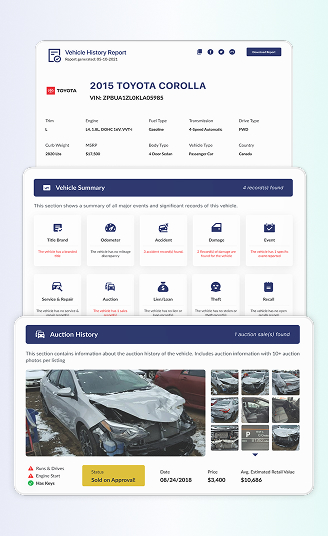
A free Hyundai VIN decoder is helpful, but the PremiumVIN VIN check report provides crucial insights over time that buyers and collectors need. It reveals patterns like title issues, unexpected mileage, recall history, and frequent auction listings that may raise red flags.
Vehicle Specifications
This section is your Hyundai’s identity card. It helps confirm you are looking at the right car, not a similar trim that someone “accidentally” listed.
Year, Make, Model
The report confirms the model year and basic identity details tied to your Hyundai VIN check. It’s helpful when listings say “close enough” or when paperwork and the badge do not fully match.
Trim
Trim matters more than most people admit. This part clarifies the trim level tied to the VIN, which can affect features, pricing, and what parts should be on the vehicle right now.
Ownership History
Ownership history is often where a Hyundai’s day-to-day life shows up. Fewer owners can be a plus, but it’s not a guarantee. More owners can be fine, but you want the timeline to look normal and consistent.
Owner Count (When Available)
When the owner count is reported, it gives you a quick snapshot of how many times the Hyundai changed hands. It’s useful for pricing conversations, and it can support your Hyundai VIN lookup before you even test drive.
Ownership Timeline
This lays out the sequence of ownership events when available, helping you see if the vehicle stayed with one owner for years or bounced around quickly. Fast flips are not always bad, but they deserve attention.
Vehicle Use Type
Sometimes records indicate personal use, fleet use, or other categories. If your Hyundai was used commercially, for example, that may explain higher annual mileage or heavier wear.
Registration Locations
This part shows where the vehicle was registered when reported. It helps especially for out-of-state buying, and it’s relevant if you are a foreign buyer trying to map the vehicle’s background.
Mileage History
A Hyundai that racks up miles steadily is usually easier to judge than one with gaps and weird drops. This section helps buyers spot mileage patterns that may signal heavy use, reporting gaps, or potential odometer inconsistencies before trusting the dashboard reading.
Mileage History from Multiple Sources
When the report has multiple mileage entries, you can compare them over time instead of relying on a single reading. It supports basic reasonableness checks, especially when a listing price feels “too clean.”
Rollback Detection and Alerts
If the mileage entries show inconsistent decreases or suspicious jumps, the report may flag it as a risk. Honestly, this is one of the biggest reasons people run a Hyundai VIN check in the first place.
Annual Usage Patterns
This helps you estimate how the Hyundai was driven year to year when enough data exists. It’s useful for buyers comparing two similar cars, where one has a calmer usage history than the other.
Last Reported Mileage and Date (When Available)
Seeing the most recent recorded mileage point can help you judge whether the odometer reading you see today fits the broader history. If it doesn’t, that’s your cue to ask direct questions.
Title Check
Title branding can change the entire value of a Hyundai, even if it looks fine in a driveway. This section reviews title-related flags that may appear in records, so you can avoid surprises after you’ve already paid.
Salvage
A salvage title can show up after a vehicle is declared a total loss by an insurer. Even if it’s repaired, the salvage brand may impact resale value and how some insurers handle coverage.
Rebuilt
Rebuilt usually means the vehicle was repaired after being branded salvage and then passed a state inspection process. It can be legal to drive, sure, but you still want the paper trail to make sense.
Lemon
A lemon brand can appear when a vehicle is repurchased due to repeated issues under warranty rules. If you see this, slow down and read carefully, because the label usually exists for a reason.
Lien/Loan check
A lien can affect whether a buyer can receive clear ownership, even if the seller seems friendly and confident. This section looks for lien or loan indicators tied to the vehicle’s records, when available.
Lien Record Identification
When lien data is present, it may show whether a recorded lien exists. For private-party sales, this helps you avoid the “I’ll pay it off next week” situation, which gets messy fast.
Dates and Locations
Lien entries can include timing and jurisdiction details. The dates and locations context can matter if you’re buying out of state, or if the Hyundai has moved around a lot between registrations.
Recalls Check
A Hyundai recall is typically repaired at no charge through the manufacturer’s dealer network, but only if the work gets done. This section helps you spot open recall items and reported completion events.
Open Recall Information
If an open recall is present in available records, this part may list it so you can follow up with a dealer. It’s a simple step that can affect safety and peace of mind.
Completed Recall Events
When recall work is recorded as completed, it helps you see whether prior owners handled it. It’s not a guarantee that every recall repair was perfect, but it’s still a useful history.
Service & maintenance Records
This section summarizes recorded maintenance and service events when they are available, which can help you judge whether the Hyundai was cared for or simply driven and ignored.
Scheduled maintenance
When scheduled services show up, it can confirm routine care like oil services and other interval work. A steady pattern is usually a comforting sign, especially on higher-mileage vehicles.
Part replacements
Replacement notes may list items like brakes, batteries, tires, or other parts. It helps you estimate what you may need to handle next, rather than being surprised two weeks after purchase.
Major or minor repairs
Repairs can be normal, but repeated repairs in the same category can hint at persistent problems. This section helps you see patterns and decide if you should bring a mechanic for a closer look.
Notes from inspections
Inspection notes can include basic observations about the condition when recorded. It’s not the same as a full pre-purchase inspection, but it can still guide your questions and priorities.
Gaps in service records (When Present)
A gap does not always mean the vehicle was neglected. Sometimes it just means records were not captured. Still, a large gap is a reason to inspect more carefully and ask for receipts.
Auction History
Auction history can explain why a vehicle appears on the market again, or why it moved fast between owners. This section covers recorded auction entries when available, which is valuable for both buyers and collectors.
Auction date and location
If an auction record exists, the report can list where and when it happened. That helps you line up the timeline with ownership and title events, instead of guessing.
Sale price
Sale prices can give context for current asking prices, especially when a seller claims the Hyundai has “never been through auction.” If the record says otherwise, well, you know what to do.
Condition notes
Auction condition notes may include primary and secondary damage labels when recorded. This can help you understand what was observed at the time, not just what the current photos show.
Number of photos taken at the auction
Photo count is a small detail, but it matters. More photos often mean better documentation of the condition at that moment, which can be useful when comparing the record to the current listing.
Sales History
Sales history can show how often a vehicle has been listed and how its presentation has changed over time. If you’re doing a free Hyundai VIN lookup search and you see odd pricing swings, this section helps confirm whether that’s part of a pattern.
Number of times listed
When prior listings are recorded, it can show how often the Hyundai hit the market. A high count may suggest flipping, unresolved issues, or simply a vehicle that changes hands often.
Condition at each listing
Sometimes, listing history includes the recorded condition notes or descriptors. If the Hyundai was once listed with damage notes and later listed as “clean,” you should ask what changed and why.
Photos from past listings
When listing photos are available, they can show the prior condition. This is helpful when the current listing looks unusually polished, and you want a clearer view of what the vehicle looked like before.
Theft Records
Nobody wants to buy a problem vehicle. Theft checks help reduce that risk. This section looks for theft-related records when available, which is especially relevant for cross-border sales and long-distance deals.
Stolen Status Check
This part can flag when a vehicle is reported stolen in available databases. If it shows up, stop and verify through proper authorities before moVIN g forward, no exceptions.
Recorded Theft Incidents
Some records show theft incidents and recovery notes when reported. It can help explain title changes, gaps in use, or why the Hyundai moved between locations suddenly.
Recovery and Post-Theft Notes (When Available)
When recovery information exists, it may show whether the vehicle was recovered and if there were damage notes afterward. That context matters because recovered vehicles can vary widely in condition.
How Checking Hyundai VIN Helped Olivia Make a Safer Buying Decision
Decoding a Hyundai VIN is not just about curiosity. It helps reduce risk. It helps people make better decisions with real information, especially when money and safety are involved.
Sample Report: KM8K23AG3LU074313
Initial Impression
- Olivia found a used Hyundai listed by a private seller. The car looked clean, the price felt reasonable, and the seller described it as lightly used with no major problems.
Critical Findings
- The Hyundai VIN report showed recorded accident history, which was not clearly discussed in the listing.
- Additional sections showed damage-related indicators reported, caused by minor/major damage incident supporting deeper inspection planning.
- Ownership history indicated more than one previous owner.
- Mileage records were available, allowing Olivia to review usage patterns over time.
- Title-related checks helped confirm that lemon branding issues were reported.
Outcome
- Instead of walking away immediately, Olivia used the report to ask direct, informed questions. She negotiated a lower price and requested a professional inspection before committing to the purchase.
Lessons Learned
- The Hyundai VIN lookup did not tell Olivia what to do. It gave her clarity. With real data in hand, she avoided guesswork, reduced risk, and made a calmer, smarter decision when dealing with a private seller.
Free Hyundai VIN Decoder vs Paid Vehicle History Report
A free Hyundai VIN decoder is useful for quick checks, but it only scratches the surface. See the difference with the full paid report below.
| What You Can Check | Free Hyundai VIN Decoder (Quick Check) | Premium Hyundai Vehicle History Report (Full Report) |
|---|---|---|
| Hyundai year, model, and make | ✓ Confirms basic identity | ✓ Fully confirmed with production details |
| Basic Hyundai specs (engine, body, trim) | ✓ General specifications | ✓ Complete factory specifications |
| Title status (e.g., salvage, rebuilt, lemon) | Basic status hint only | ✓ Full title brand history |
| Accident history check | Not available | ✓ Detailed accident records when reported |
| Mileage and odometer records | Not available | ✓ Multiple recorded mileage entries |
| Odometer rollback/mileage inconsistency checks | Not available | ✓ Rollback flags and inconsistency alerts |
| Auction history and photos | Not available | ✓ Auction listings and images when available |
| Online listings and advertised sales | ✓ Current listing snapshot (when available) | ✓ Listings and advertised sales records |
| Timeline of previous listings and sales | Not available | ✓ Timeline of past listings and sale activity |
| Sales listings records & photos | Not available | ✓ Listing records and photos (when available) |
| Hyundai market value estimate | Not available | ✓ Value estimates and pricing ranges |
| Number of previous owners | Not available | ✓ Owner count (when available) |
| Past vehicle use (private, rental, fleet, commercial) | Not available | ✓ Use-type indicators when reported |
| Outstanding loans or lien records | Not available | ✓ Lien/loan flags when reported |
| Stolen vehicle check | Limited check | ✓ Detailed theft records if reported |
| Flood, fire, or hail damage indicators | Not available | ✓ Damage-event indicators when reported |
| Reported service or repair history | Not available | ✓ Service/repair records (when available) |
| Recall and warranty information | Limited overview | ✓ Recall history and basic warranty status |
| Downloadable PDF report | X Not included | ✓ Yes, easy-to-save PDF |
| Best suited for | Quick Hyundai VIN lookup and early screening | Buyers, sellers, collectors, and serious checks |
How to Get a Hyundai Vehicle History Report by VIN Number Lookup
Getting a Hyundai VIN report through PremiumVIN is simple. You do not need technical knowledge or special documents.

Step 1: Enter Your VIN
Enter the 17-character Hyundai VIN or classic chassis number into the form above carefully.

Step 2: Review the Preview
After you submit the VIN. In seconds, you can check the basic vehicle details to confirm you entered the correct VIN.

Step 3: Get the Report
Proceed to payment and view the full report for detailed vehicle history records.
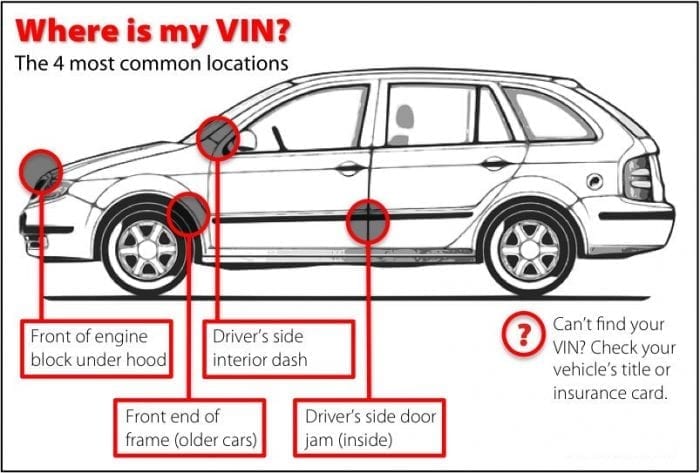
Where to Find the Hyundai Vehicle Identification Number?
Your Hyundai VIN is usually easy to locate once you know where to look.
Dashboard (Driver’s Side)
The Hyundai VIN is usually displayed on a small metal plate where the dashboard meets the glass.
Driver’s Door Frame
Open the driver’s door and check the sticker on the door jamb or B-pillar.
Under the Front Passenger Seat
In some Hyundai models, the VIN may be stamped on the floor. Slide the front passenger seat back and lift the carpet flap to check.
Engine Bay
The VIN can sometimes be found stamped on the metal firewall or inner frame inside the engine compartment.
Vehicle Documents
Your Hyundai VIN is also printed on official documents such as the registration, title, and insurance card.
Explore Other Hyundai VIN Search Tools
If you want more than a standard VIN lookup, you can explore other Hyundai tools below.
A Hyundai window sticker shows original factory pricing, standard features, and optional equipment. It helps buyers understand how the vehicle was originally configured and compare trims accurately.
Hyundai recall checks help identify open or completed recalls linked to safety or compliance issues. This helps owners handle repairs early and avoid unnecessary risks.
The Hyundai License plate lookup tool can help find vehicle details when the VIN is not immediately available, especially for quick checks.
Title checks help confirm legal ownership status and branding. This tool supports safer buying decisions and reduces ownership disputes.
Hyundai at a Glance: Brand Facts and Background
Hyundai is known for practical engineering and steady global growth. Over the years, the brand has built a reputation for reliability and value across many markets.
The Brief History of Hyundai
Hyundai Motor Company was founded in South Korea and began vehicle production in the late 1960s.
- The Hyundai Motor Company was officially established in 1967, marking its entry into automobile production.
- Early Hyundai cars were built through a partnership with Ford, starting with models like the Cortina.
- Hyundai launched its first self-developed car, the Pony, in 1975, which became a major export success.
- The brand entered the U.S. market in 1986 with the Hyundai Excel, gaining rapid attention for affordability.
- Hyundai expanded globally by investing heavily in research, technology, and overseas manufacturing plants.
- In 1998, Hyundai acquired Kia Motors, forming what is now known as Hyundai Motor Group.
- Today, Hyundai produces gasoline, hybrid, electric, and fuel-cell vehicles for markets worldwide.
Decode Your Hyundai VIN Now
Check your Hyundai VIN today to confirm key vehicle details and avoid unnecessary risks before moving forward.
Frequently Asked Hyundai VIN Questions
Is a Hyundai VIN lookup free?
Yes, PremiumVIN provides a free Hyundai VIN lookup that shows basic vehicle identity details, including year, make, model, engine, and trim, with optional paid reports for deeper history records like stolen check, mileage, accident & damage records, lien/loan, and more.
How to check a Hyundai car VIN number?
You can check a Hyundai car VIN number by entering the Hyundai VIN into PremiumVIN’s VIN decoder to view the available basic specifications and identification details online at no cost.
Where is the VIN number on a Hyundai?
The Hyundai VIN number is typically found on the driver’s side dashboard (visible through the windshield), on a sticker inside the driver’s side door jamb, on registration/insurance documents, or stamped under the passenger seat or in the engine bay on some models.
What does a Hyundai VIN start with?
Most Hyundai VINs start with letters indicating the manufacturing country and company, like N (Turkey/USA), K (Korea), or 2 (Canada), followed by codes for vehicle type, series, and body style, with the first digit revealing the geographic zone and the second the manufacturer, such as M for Hyundai Motor Co. (Korea) or N for Hyundai Motor Mfg. Alabama (USA).
What can a VIN number tell you for free?
With PremiumVIN a VIN number can tell you a vehicle’s manufacturer, make, model, year, engine, assembly plant, and country of origin for free. For deeper records, upgrade to the premium report and see theft records, title check status, open recalls, and safety recall history, helping you avoid major issues before buying.
Can I look up my car VIN online?
Yes, you can look up my car VIN online by inserting your VIN into online VIN lookup tools like PremiumVIN, which allow you to check vehicle details quickly without visiting a dealership or office.
How to decode a VIN number manually?
To decode a VIN number, break the 17-character code into sections:
- The first three digits (World Manufacturer Identifier or WMI) indicate the world region and manufacturer.
- The next six digits (positions 4-8) provide details about the vehicle’s features, such as engine type, body style, and model.
- The ninth digit serves as a security check digit.
- The tenth digit reveals the model year of the vehicle.
- The eleventh digit identifies the assembly plant where the vehicle was manufactured.
- The final six digits represent the unique production serial number.
You can either interpret these segments manually or use free online VIN decoders from sites like PremiumVIN to simplify the process.