
Smart VIN Decoder - Check Specs by VIN
Use our free Smart VIN decoder to check your vehicle’s engine, trim, transmission, model year, and factory specifications in seconds. Enter any valid Smart VIN number to instantly decode important vehicle details before buying, selling, or verifying your car.
What is the Smart VIN Decoder?
A Smart VIN number (Vehicle Identification Number) is basically your Smart’s identity code. For most modern Smart vehicles, it’s a 17-character mix of letters and numbers, and it stays tied to the car for life. You’ll see it used for registration, insurance, recalls, servicing, or listing information.
You don’t need to memorize VIN positions or decode anything by hand. Just enter it and let the free Smart VIN decoder do the basic work. And if you want the deeper checks (e.g., title issues, mileage flags, accident records, liens, or auction history), PremiumVIN can run a Smart VIN check and build a full report. Using a Smart VIN lookup helps confirm the vehicle’s identity and allows buyers and owners to verify that the car matches its original factory configuration.
And we support both modern 17-character Smart VINs and classic VIN formats (5–14 characters) where records are available.
What Information Can You Get from a Smart VIN Number?
By using a Smart VIN decoder, you can uncover essential factory details that help verify a vehicle’s identity before purchase.
Factory Specifications You Can Uncover
Manufacturer Information
Identifies who built the vehicle. Smart has ties to Mercedes-Benz and, more recently, the Geely joint venture.
Model and Trim
Confirms whether the vehicle is a Fortwo, Forfour, Roadster, Crossblade, or EQ electric model, plus trim levels like Passion, Prime, or Pulse.
Engine Type
Reveals engine size, fuel type, and performance specifications. For EQ models, this includes electric motor details.
Transmission
Shows whether the vehicle has a manual, automatic, or semi-automatic transmission.
Body Style
Identifies whether the Smart is a coupe, convertible, or hatchback.
Model Year
Pinpoints the exact production year of the vehicle.
Assembly Plant
Shows which factory produced the vehicle (e.g., Hambach, France).
This information is useful when buying a used Smart, verifying vehicle specifications, or checking whether a vehicle matches the seller’s description.
How to Decode a Smart VIN Number
Decoding your Smart VIN is simple and takes less than a minute.

Step 1: Find Your VIN
Find the 17-digit VIN number on the vehicle dashboard, driver-side door jamb, or registration documents.

Step 2: Enter the VIN
Type or paste the full Smart VIN into the decoder tool above.

Step 3: Access Factory Specifications
Instantly view the vehicle's factory specifications, including engine, trim, transmission, and model year.
Where to Find Smart Vehicle Identification Number?
Most Smart vehicles have the VIN in a few common places. If you can’t find it right away, don’t overthink it. Check the usual spots first.
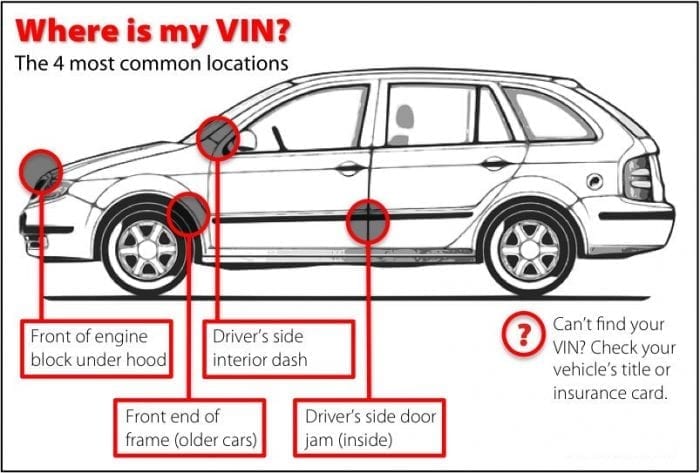
Dashboard
Look at the lower corner of the windshield on the driver’s side. Many cars, including Smart models, place a VIN plate here.
Driver-side door jamb sticker
Open the driver’s door and check the label area on the door frame. This is a very common VIN location.
Vehicle paperwork
Your title, registration, and insurance documents usually show the VIN clearly. This is often the easiest option.
Service and maintenance documents
Some service invoices list the VIN. Helpful if you’re looking at a car you don’t own yet.
Chassis stamping
On some vehicles, the VIN may be stamped on the body or frame area. If it’s hard to access, a mechanic can help locate it.
How to Read a Smart VIN Number
Most modern Smarts use a 17-character VIN. It’s split into three main parts: WMI, VDS, and VIS. If you’ve ever looked at a VIN and thought, “This is just random,” you’re not alone. But it’s organized, and once you know the sections, it’s easier to read.
WMI (World Manufacturer Identifier)
The WMI is the first 3 characters of the VIN. It identifies the manufacturer and region. For many Smart models, you may see VINs starting with WME. This first section (WMI) identifies the manufacturer/region, but exact patterns can vary by market and model year.
Characters 1-3 – Manufacturer and Country (WMI)
This part is basically the “who made it” header before the car-specific details begin.
WMI Character Meaning
- 1st Character (W): Region code (Europe)
- 2nd Character (M): Manufacturer group identifier (assigned within the WMI system)
- 3rd Character (E): Specific manufacturer designation within that assignment
The WMI assignments are standardized through the VIN/WMI system used by regulators and industry bodies, which is why the first characters matter.
VDS (Vehicle Descriptor Section)
The VDS is characters 4 through 9. This is the section that describes the vehicle in a more “model-specific” way. It can include details like body style, restraint system, engine type, and other attributes, depending on how the manufacturer encodes it. Also, in North America, the 9th character is commonly used as a check digit to validate the VIN.
VDS Character Meaning
- 4th–8th Characters: Vehicle descriptor details (varies by Smart model/year/market)
- 9th Character: Check digit (used to validate the VIN in certain regions)
VIS (Vehicle Identifier Section)
The VIS is characters 10 through 17. This part helps identify the specific vehicle, often including the model year code, plant code, and the serial number. If you’re trying to find the production year of a Smart car from the VIN, the 10th character is usually where you start for modern 17-character VINs.
VIS Character Meaning
- 10th Character: Model year code (standardized for modern VINs). This character indicates the production year. For example, N=2022, P=2023, R=2024, S=2025.
- 11th Character: Assembly plant code (varies by manufacturer)
- 12th–17th Characters: Sequential production number (serial)
Model-Specific VIN Decoding Guides
Below are a few popular Smart models people search for. But PremiumVIN supports decoding across Smart model variants and years, including older VIN formats when available.
Fortwo
Forfour
Roadster
Roadster-Coupé
Crossblade
EQ Fortwo
EQ Forfour
Who Should Use the Smart VIN Lookup Tool?
This Smart VIN lookup tool is for anyone who wants fewer surprises and more facts. The free Smart VIN decoder helps with quick identity checks, and the premium report adds deeper history when you need it.
Buying a used Smart can be fun, but it’s also easy to miss details in a short test drive. A Smart car VIN decoder helps you confirm what the car is, and the premium report helps you check the history behind it.
Identify hidden damages before purchase
The report can show damage and accident signals when reported, so you’re not relying only on fresh paint or a clean interior.
Avoid title surprises at registration time
Title records can flag salvage, rebuilt, or lemon branding when available, which may affect ownership transfer.
Confirm it’s the exact Smart model being advertised
A quick decode smart VIN check helps verify year, make, model, and basic configuration so the listing matches the real car.
If you’re selling a Smart, buyers will ask questions. Having a VIN-based report ready makes the sale clearer. It helps you answer the common questions upfront, support your price with facts, and reduce last-minute disputes.
Verify a vehicle’s value
A VIN report can support pricing with historical context, especially when condition and records justify the number.
Reduce back-and-forth with serious buyers
A Smart VIN check answers common questions early, so fewer people waste your time.
Handle fleet or dealership inventory faster
VIN lookup helps with quick screening so you don’t spend hours on the wrong unit.
Collectors and enthusiasts are a different crowd. You care about the story, the originality, and whether the car makes sense as a piece of automotive history. A Smart VIN lookup helps you build that picture without guessing.
Compare two Smarts side-by-side without confusion
Decoding two VINs helps you see differences in year, trim, and production details when available.
Track ownership patterns that affect collector value
Owner count and timeline signals can support provenance, especially for older or specialty vehicles.
Support insurance documentation for collector coverage
A VIN report can help provide background details for valuation discussions, when available.
Need More Than Smart Specs? Get a Full Vehicle History Report
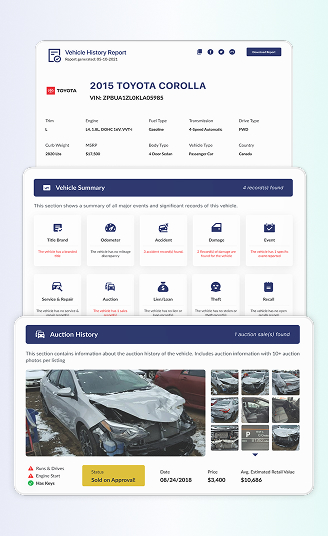
A free VIN decoder is a good start, but it’s not the whole picture. A Smart premium history report is where things get practical, especially if you’re buying used, importing, or trying to verify any Smart models like Smart Fortwo, Smart electric model, or even a rarer Smart build. What will you get from a VIN check:
Title Check
Title branding is one of those things that can follow a car for years. This section helps you catch major red flags early, especially if you’re doing a Smart VIN check before paying a deposit.
Salvage
A salvage brand usually means the vehicle was declared a total loss at some point. The report helps you spot this so you’re not “discovering” it later at registration or resale time.
Rebuilt
Rebuilt titles can mean a vehicle was repaired and returned to the road after a major event. The report gives you a clue about past severity, so you can ask better questions.
Lemon
A lemon title can indicate a manufacturer buyback or serious recurring issues. If a Smart has this branding, you’ll want to understand why, not just accept a low price.
Junk / Non-Repairable
If a title is marked non-repairable or junk, that can affect road legality and registration. This line is easy to miss in a listing, so it’s worth having it spelled out.
Vehicle Specifications
This section is the “who are you, really?” part of the report. It confirms Smart’s core identity and configuration, so you can match the listing to the vehicle and avoid trim confusion.
Year, Make, Model
The report lists the year, make, and model linked to the Smart VIN, so you can confirm you’re looking at the right vehicle before you go deeper. This is especially helpful when listings are vague or translated poorly.
Trim
Trim details help you spot mismatches, like a seller calling it a higher trim than it really is. With a Smart VIN lookup tool, trim info can also explain why two “similar” Smarts have different equipment.
Engine and Powertrain
When reported, you’ll see engine and powertrain details tied to the VIN. For Smart owners, this matters because small changes in configuration can affect parts, servicing, and even resale value.
Transmission and Drivetrain
If transmission or drivetrain data is available, the report lists it clearly. That’s useful when you’re comparing a few used Smarts and trying to avoid surprises after you buy.
Ownership History
Ownership history gives you context. A Smart that changed hands often isn’t automatically “bad,” but it does raise questions, and this section helps you ask them calmly.
Owner Count
When reported, you’ll see how many owners the vehicle has had. Lower owner counts can be reassuring, but what really matters is whether the timeline makes sense.
Ownership Timeline
This shows a rough sequence of ownership events. It’s helpful for foreigners importing vehicles, because paperwork can be messy, and you want a clearer chain of custody.
Vehicle Use Type
If a vehicle was used as a personal car, fleet unit, rental, or commercial use (when reported), the report may show it. Usage type can influence wear patterns, even on a small Smart.
Registration Locations
Registration locations (when available) give a sense of where the Smart lived. This can matter for climate exposure, storage conditions, and inspection routines.
Length of Ownership Signals
Short ownership periods can be normal, or they can be a hint that something wasn’t right. This part helps you notice patterns instead of relying on gut feeling alone.
Mileage History
Mileage is where people get emotional, because it affects the price fast. This section helps you check whether the mileage story is steady, or a little too “convenient.”
Mileage History from Multiple Sources
When available, the report compares mileage readings from different points in time. You’re looking for a smooth progression, not weird drops or missing years.
Rollback Detection and Alerts
Rollback indicators don’t always prove fraud, but they do signal risk. If something looks off, you can slow down and request supporting documents before buying.
Mileage Gaps and Inconsistencies
If the record shows gaps, the report can highlight them. Missing mileage data isn’t automatically a deal-breaker, but it’s a reason to verify service history carefully.
Lien/Loan Check
Liens are one of the most frustrating “surprises” after purchase. This section helps you see whether the vehicle may have a recorded financial claim attached to it.
Lien Record Identification
If a lien is recorded in available sources, the report may show it. That matters because unresolved liens can complicate title transfer or ownership rights.
Dates and Locations
When available, lien entries may include dates and locations. This helps you confirm whether the lien is current, old, or possibly tied to a previous owner.
Verified Sources
PremiumVIN’s report uses available source records to support lien checks. It reminds you to verify properly before you pay, especially in private-party sales.
Accident Records
Accident history doesn’t always mean “walk away,” but you should know what happened. This section gives you a structured way to review what’s reported about collisions.
Number of Accidents Reported
When records are available, the report lists the number of accident events tied to the Smart VIN. That’s a quick first filter before you look at details.
Date of Reported Accidents
Dates help you place accidents in context. A very recent accident is a different conversation from something from many years back with clear repairs.
Reported Accident Location
Location can sometimes hint at road conditions or exposure risks. It also helps you cross-check paperwork if the seller gives you repair receipts.
Severity Notes
Some records include severity signals (minor vs major) or related flags. If that appears, treat it as a prompt to inspect more carefully, not as a final verdict.
Auction History
This section will show you that auction and online listing data can be surprisingly helpful, even for people who “never buy from auction.” It shows how the vehicle appeared at a point in time, sometimes with photos and condition notes.
Auction Date and Location
When available, you’ll see where and when the Smart appeared at auction. That can help you connect it with ownership changes or damage records.
Sale Price
Price history at auction can give context, especially when a seller is asking far above what seems reasonable. It’s not perfect, but it’s a reference point.
Condition Notes
Auction condition notes often mention primary and secondary damage. Even if the car was repaired later, those notes help you understand what happened earlier.
Whether the Vehicle Started or Ran
Some auction records note whether the vehicle started or ran at the time. This is a big clue, especially if you’re checking a Smart with past damage.
Number of Photos Taken at Auction
Photo count can indicate how thoroughly the vehicle was documented. More photos often mean you can verify the condition and spot inconsistencies later.
Service & Maintenance Records
Service records help you judge how the Smart was treated. A neat interior is nice, but consistent service history is what really supports long-term reliability.
Scheduled Maintenance
When recorded, scheduled maintenance entries help show routine care. This is useful for spotting owners who followed basic upkeep rather than ignoring it.
Part Replacements
Part replacement history can explain improvements, recurring issues, or major work. It can also help you plan future maintenance based on what was already done.
Major or Minor Repairs
Repair records (when available) can show the difference between normal wear and repeated problems. If you see the same issue over and over, ask why.
Notes from Inspections
Inspection notes can include small warnings that never show up in ads. This part is sometimes where you learn the “real reason” a car was listed.
Theft Records
Nobody wants to buy a stolen car. This section checks available signals so you can reduce that risk before money changes hands.
Stolen Status Check
The report may show whether the vehicle is flagged as stolen in available records. If it is, stop and verify immediately before doing anything else.
Recorded Theft Incidents
When incidents are recorded, you may see entries that help clarify timing and status. Even older theft events can complicate paperwork depending on the jurisdiction.
Recalls Check
Recalls are a safety issue, often prompted by a government agency like the NHTSA or the manufacturer. This section helps you see whether recall-related items are linked to the vehicle, and what still needs attention.
Open Recall Information
If open recalls are listed, you’ll see the recall information and what it relates to. Open recalls are often fixable, but you want to know before you buy.
Completed Recall Events
Completed recalls (when available) can show that work was already done. That’s reassuring, especially for used Smart vehicles with a long ownership chain.
Manufacturer and Safety Agency Notices
This area can include recall notices tied to safety agencies and manufacturer reporting. It helps you understand what the recall is about in plain language.
Recall Timeline and References (When Available)
If dates and reference numbers are available, the report may include them. Those details make it easier to confirm repairs with a dealer or service center.
Real Story: How a VIN Check Helped Kaylia to Make a Decision
A Smart is small, but the decisions around it can be expensive. If you’re buying used, a VIN decode helps confirm identity. A full history report helps confirm the story.
Sample Report: WMEFJ5DA1GK123877
Initial Impression
- Kaylia was considering a 2016 Smart Fortwo advertised as clean and problem-free. While the listing appeared reasonable, she decided to verify the vehicle using PremiumVIN before proceeding.
Critical Findings
- No salvage, rebuilt, or lemon title branding reported
- No accident records found
- Mileage readings appeared consistent across available records
- Hail-related damage noted in sales historical records
- Minor dents and scratches reported in auction data
- Vehicle previously registered as a rental unit
- Multiple sales and auction listing records identified
Outcome
- Armed with these details, Kaylia was able to ask informed questions and request supporting documentation from the seller. The VIN report helped her clearly assess the vehicle’s background and decide whether to proceed.
Lessons Learned
- A free Smart VIN lookup is suitable for basic identification, but a premium vehicle history report provides the depth needed to evaluate condition, usage, and risk with confidence.
Free Smart VIN Decoder vs. Paid Vehicle History Report
Think of free decoding as a first look. The premium report is what you use when you want to know the vehicle’s past, not just its label.
| What You Can Check | Free Smart VIN Decoder (Quick Check) | Premium Smart Vehicle History Report (Full Report) |
|---|---|---|
| Smart year, model, and make | ✓ Confirms basic identity | ✓ Fully confirmed with production details |
| Basic Smart specs (engine, body, trim) | ✓ General specifications | ✓ Complete factory specifications |
| Title status (e.g., salvage, rebuilt, lemon) | Basic status hint only | ✓ Full title brand history |
| Accident history check | Not available | ✓ Detailed accident records when reported |
| Mileage and odometer records | Not available | ✓ Multiple recorded mileage entries |
| Odometer rollback/mileage inconsistency checks | Not available | ✓ Rollback flags and inconsistency alerts |
| Auction history and photos | Not available | ✓ Auction listings and images when available |
| Online listings and advertised sales | ✓ Current listing snapshot (when available) | ✓ Listings and advertised sales records |
| Timeline of previous listings and sales | Not available | ✓ Timeline of past listings and sale activity |
| Sales listings records & photos | Not available | ✓ Listing records and photos (when available) |
| Smart market value estimate | Not available | ✓ Value estimates and pricing ranges |
| Number of previous owners | Not available | ✓ Owner count (when available) |
| Past vehicle use (private, rental, fleet, commercial) | Not available | ✓ Use-type indicators when reported |
| Outstanding loans or lien records | Not available | ✓ Lien/loan flags when reported |
| Stolen vehicle check | Limited check | ✓ Detailed theft records if reported |
| Flood, fire, or hail damage indicators | Not available | ✓ Damage-event indicators when reported |
| Reported service or repair history | Not available | ✓ Service/repair records (when available) |
| Recall and warranty information | Limited overview | ✓ Recall history and basic warranty status |
| Downloadable PDF report | X Not included | ✓ Yes, easy-to-save PDF |
| Best suited for | Quick Smart VIN lookup and early screening | Buyers, sellers, collectors, and serious checks |
How to Get a Smart Vehicle History Report by VIN
Getting a report is straightforward. You enter the VIN, review the preview, and then decide if you want the full report.
Step 1: Enter Your VIN
Paste the 17-character Smart VIN number (or a supported classic VIN format) into the PremiumVIN decoder tool.
Step 2: Review the Preview
You’ll see a preview of decoded basics first, so you can confirm you typed the VIN correctly.
Step 3: Get the Report
If you want the full history, continue to generate the premium report and download the PDF.
Explore Other Smart VIN Search Tools
If you’re working with a Smart, you might need more than just a VIN decode. See other Smart tools below, especially if you’re trying to confirm options, ownership paperwork, or recall status.
A Smart window sticker (monroney label) is the original “summary sheet” for how the vehicle was configured when sold. It can help confirm trim and key equipment without relying on memory or sales talk.
Recall checks matter more than people admit. A Smart recall lookup can help you see available open recall information so you can handle safety issues early. If you’re buying used, it’s also a fair negotiating point, because recall work takes time even when the fix is free.
If you don’t have the VIN but you have a plate number, license plate lookup can help you pull vehicle-identifying information when available. It’s a practical option for quick screening, especially when sellers share only partial details at first.
A title check focuses on the paperwork side: salvage, rebuilt, lemon branding, and other title-related risks when reported. It’s especially helpful for older Smarts and cross-state purchases, where the vehicle’s “story” can change depending on where it’s been registered.
Smart at a Glance: Brand Identity and Design Philosophy
Smart has always been a bit different. It’s known for compact city cars, a design-forward identity, and a history that’s closely tied to Mercedes-Benz engineering culture. In recent years, the brand has been operated through a Mercedes-Benz and Geely joint venture, which is why you’ll see Smart connected to both groups depending on the market and model year.
The Brief History of Smart
Smart was created in the 1990s and became famous for small two-seat city cars like the Fortwo.
- Smart’s modern direction focuses heavily on electrification in many markets, especially under the newer joint-venture era.
- The brand is now operated by Smart Automobile Co., Ltd., established by Mercedes-Benz and Geely as a 50:50 global joint venture.
Why Users Trust Our Smart VIN Decoder
People use VIN tools when they need answers that are clear, not salesy. PremiumVIN focuses on giving Smart owners and buyers a report that feels grounded, readable, and useful.
Daily data updates
Vehicle records can change over time. Daily updates help ensure your Smart VIN check reflects the latest reported status that is available in the connected datasets.
24/7 customer support
If your Smart VIN returns an error, partial results, or you have a question about what you’re seeing, support is available to help you interpret it.
High accuracy, cross-checked results
We cross-check the VIN output across structured decoding and available records. If something conflicts, the report helps you notice it instead of hiding it.
Most comprehensive database coverage
We pull together multiple record types when available, so a Smart VIN lookup isn’t limited to basic decoding. That broader coverage matters when history is complicated.
Unlimited free checks
You can run the free Smart VIN decoder as often as you want for early screening. It’s helpful when you’re sorting through multiple listings.
Downloadable PDF
The premium report is available as a PDF, so you can save it, share it with a mechanic, or keep it for your records without re-checking later.
Decode Your Smart VIN Now
Use our Smart VIN decoder to instantly verify engine details, trim level, transmission, model year, and factory specs.
If you need deeper information, upgrade to access a complete Smart vehicle history report and make more informed buying decisions.
Frequently Asked Smart VIN Questions
Where is the VIN located on a Smart Fortwo or Forfour?
The VIN on a Smart Fortwo or Forfour is usually located on the driver-side dashboard near the windshield and on the driver-side door jamb. Start with our Smart VIN decoder once you find it, then use the premium report if you need history details.
How do I check for smart car recalls (e.g., Takata airbags) using the VIN?
Enter the VIN and review the recall section in the report if recall data is available for that vehicle. If you’re shopping used, checking recalls early helps you avoid safety headaches later.
Can I get a vehicle history report for a used Smart car with just the VIN?
Yes. The VIN is the key identifier. Use the Smart VIN lookup to confirm basics first, then generate the premium history report to check title, mileage, accidents, liens, and more when reported.
What do the characters in a smart VIN mean?
A 17-character VIN is split into WMI (who made it), VDS (vehicle details), and VIS (year/plant/serial). If that sounds tedious, honestly, just decode the smart VIN using the tool and read it in plain English.
How do I decode the VIN to find the model year and trim level (Passion, Prime, etc.)?
The model year is commonly tied to the 10th character on modern VINs, and trim details may appear through decoding and reporting data when available. PremiumVIN shows decoded year and trim signals without you doing manual charts.
How can I find out the production date of my Smart car from the VIN?
The VIN can strongly indicate model year, but the exact production date is not always encoded in a universal way. A premium Smart VIN check may show production-related details when available from records tied to that VIN.
Where can I decode a smart VIN for free online?
You can use the free Smart VIN decoder on PremiumVIN for quick identity checks. If you’re buying or selling, the premium report adds the deeper history that free tools usually don’t include.
How do I use the VIN to order the correct parts (like a specific belt or filter)?
Use the VIN to confirm the exact year, model, engine, and configuration first. Once that matches, parts suppliers and mechanics can reference the correct catalog. PremiumVIN helps by presenting those basics clearly from the VIN.
Are VIN decoders reliable for the first-generation Smart (450) models?
They can be, but older formats and market-specific data can be inconsistent. That’s why PremiumVIN supports classic VIN formats when available, and it’s smart to verify with documents if results are limited.
What if my Smart VIN returns no results or errors?
First, re-check characters that are easy to mistype (like 0 vs O). If it’s an older or non-standard VIN, results can be limited. PremiumVIN support can help you interpret what’s happening and what options you have.