
Geo Window Sticker Lookup by VIN for Original MSRP & Vehicle Options
If you’re looking to unlock the original factory details of your Geo vehicle, a Geo window sticker by VIN is the most accurate and reliable source. Whether you’re buying, selling, or verifying a Geo model, this sticker provides essential information straight from the manufacturer. Our Geo window sticker lookup tool makes it easy to access this data in seconds.
What Is a Geo Window Sticker by VIN?
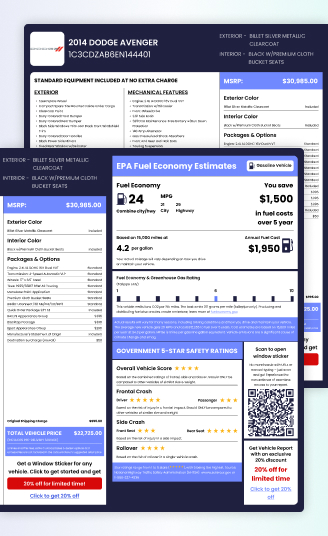
A Geo window sticker is the official document provided by the manufacturer that details your vehicle’s original specifications, features, and pricing.
Since Geo models are older vehicles, the original sticker is usually lost. However, using the vehicle’s unique 17-character Vehicle Identification Number (VIN), you can perform a Geo window sticker lookup to retrieve a reproduction of this original document. This ensures you know exactly how the vehicle left the assembly plant.
Information You Can Find on a Geo Window Sticker
The Monroney Label contains numerous data points, all tied directly to your specific Geo VIN:
Vehicle Description
This section includes the make, model, model year, exterior, and interior color.
Standard Equipment
A detailed list of all features that were included in the vehicle’s base price for that specific trim level.
Warranty Information
A summary of the manufacturer’s original warranty coverage, including terms for the basic (bumper-to-bumper) and powertrain warranties.
Manufacturer’s Suggested Retail Price
The base price of the vehicle is suggested by the manufacturer before any options or charges are added.
Optional Equipment
A clear breakdown of all factory-installed options and packages, along with the individual price for each. This is essential for determining the true original value.
Destination Charge
The non-negotiable fee charged by the manufacturer to transport the vehicle from the assembly plant to the dealership.
Total Price
The final Manufacturer’s Suggested Retail Price which is the sum of the MSRP, Optional Equipment, and Destination Charge.
Fuel Economy / EPA Label
Original EPA estimates cover city, highway, and combined MPG, along with annual fuel costs and greenhouse gas ratings.
Safety Ratings
Features the crash test ratings from the National Highway Traffic Safety Administration (NHTSA) for frontal, side, and rollover protection.
Why Geo Window Stickers Matter
Geo vehicles, produced as a joint venture between GM and Suzuki, are now considered collectible classics. The window sticker is essential for verifying the exact factory build of your Geo.
Distinguish Trim Levels
Confirm whether the vehicle is a base model, a sporty Tracker, or a Prizm, each with different equipment and value.
Verify Market Origin
For models like the Geo Metro or Storm, confirm if the vehicle was manufactured for the U.S. market and has the correct emissions and safety equipment.
Validate Factory-Installed Options
Ensure that premium options like air conditioning, upgraded audio systems, or specific engine configurations were factory-installed, not added aftermarket.
Support Collector Valuation
Provide documented proof of factory specifications, which is critical for accurate appraisal and insurance of these classic vehicles.
Why Do You Need a Geo Window Sticker?
The window sticker is a crucial document for confirming the authenticity and value of your Geo.
Buyers
Buyers can confirm the vehicle’s original features, trim level, factory options, and pricing, helping them verify authenticity and negotiate with confidence.
Sellers
Sellers can showcase verified factory information to attract serious buyers and justify their asking price.
Dealers
Dealers can use window stickers to provide accurate, professional listings and enhance customer trust, especially for older and classic Geo vehicles.
How to Get the Original Geo Window Sticker by VIN?
Obtaining your Geo’s Monroney label is quick and secure. Here’s how:
Enter the VIN
Locate and input your 17-digit Geo VIN into the form. This unique identifier ensures precise results.
Submit Your Request
Click the “Get a Window Sticker” button to preview your sticker.
Receive Your Sticker
Complete the payment process to download or print your window sticker.
Save, Print, or Share
Use your digital sticker for personal records, resale listings, or dealership documentation.
Where to Find Your Geo VIN?
Finding your Geo’s 17-character VIN is simple. Look for it in one of these common locations:
Driver’s Side Dashboard
Viewable through the windshield, typically on the lower corner.
Driver’s Door Jamb
On a sticker located where the door latches when closed.
Vehicle Documents
The VIN is also listed on your vehicle’s insurance cards, registration, and title documents.
Popular Geo Models Supported
Our Geo window sticker lookup supports a range of models, including:
Geo Metro
Geo Prizm
Geo Storm
Geo Tracker
Why Do You Need to Use Our Geo Window Sticker Lookup Tool?
Our lookup tool is built to deliver precise and easy-to-read Geo window stickers for any model and year.
- Fast: Get your complete factory sticker in seconds using only the VIN.
- Accurate: We pull verified manufacturer-sourced data to ensure reliability for older Geo models.
- Helpful: Provides full access to original specifications, pricing, and features for buying, selling, or documentation.
- Expert Support: Our team is available to help you understand your sticker or assist with any VIN lookup issues.
Get Your Geo’s Original Window Sticker Today
Unlock your vehicle’s authentic factory information with our Geo window sticker by VIN tool. Just enter your VIN and get instant access to a detailed sticker that showcases your Geo’s original specifications, pricing, and features.
Start your Geo window sticker lookup now and get the information you need.
FAQs About Geo Window Sticker Lookup by VIN
How to get a Geo window sticker with VIN?
Because Geo is a discontinued brand, the original manufacturer no longer issues window stickers directly; instead, trusted third-party VIN decoding services gather the factory-issued data to recreate an accurate replica. With your 17‑character VIN, you can easily generate a reproduction of your Geo’s original window sticker through our specialized lookup tool.
What information does a Geo window sticker include?
A Geo window sticker includes the original MSRP, standard and optional equipment, engine and transmission details, destination charge, safety ratings, and fuel economy information.
Where can I find the VIN to generate a Geo window sticker?
You can find the Geo VIN on the driver’s side dashboard near the windshield, inside the driver’s door jamb, or on vehicle documents such as the title, registration, or insurance card.