
Nissan Window Sticker Lookup by VIN - Get Specs & MSRP
Use our Nissan Window Sticker by VIN to access the sticker that provides crucial information about the vehicle’s specifications, pricing, and features. Click the form to get the window sticker instantly!
What Is a Nissan Window Sticker?
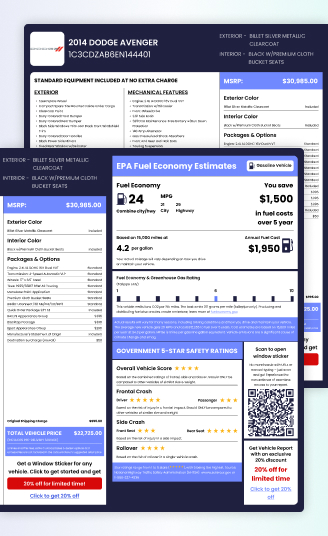
A Nissan window sticker, commonly known as a Monroney label, summarizes important information about a new vehicle’s listed pricing, equipment, and specifications. Depending on the vehicle, it can include the MSRP, standard features, optional equipment, packages, fuel economy information, safety details, and other pricing-related information.
A Nissan’s configuration can vary significantly by model, trim, drivetrain, and available packages. By entering the 17-digit VIN into our Nissan window sticker lookup, you can check the sticker information associated with that specific vehicle.
Why a Nissan Window Sticker Matters
A Nissan window sticker can help you examine the vehicle’s listed configuration and pricing. Nissan vehicles can differ significantly in equipment, drivetrain, powertrain, and pricing even when they share the same model name.
Buyers
A Nissan window sticker can provide useful context when comparing used vehicles, particularly when two examples of the same model have different trims, packages, or equipment.
Confirm the Model and Trim
Use the sticker information to determine which Nissan configuration you are looking at. This can be useful for models such as the Altima, Sentra, Rogue, Pathfinder, Murano, Armada, Frontier, and LEAF, where equipment and specifications can vary by trim and model year.
Find Options That Are Not Obvious
Use the window sticker to spot items such as Intelligent AWD, ProPILOT Assist, premium audio, heated seats, panoramic moonroofs, towing equipment, and other listed packages.
Compare New-Price Context
The listed MSRP can show how the Nissan was priced when new based on its available configuration. Compare that figure with the current asking price while also considering mileage, condition, age, and equipment.
Sellers
A window sticker can help sellers add more substance to a Nissan listing by providing configuration details that may otherwise be left out.
Turn Equipment Into Selling Points
Use the window sticker to identify desirable equipment, packages, technology, drivetrain features, and other details that can be highlighted in the listing.
Make the Listing More Persuasive
Calling out features such as a premium audio system, panoramic moonroof, advanced driver assistance, or an upgraded package can make the listing more informative and relevant to shoppers.
Dealers and Retailers
For dealerships, the Nissan window sticker can support everything, including sales conversations. It can help sales teams present a vehicle’s configuration and highlight features that may matter to prospective buyers.
Highlight Features Worth Paying Attention To
Knowing which technology, comfort, performance, or convenience equipment is associated with the vehicle can make it easier to tailor the presentation to each shopper.
Support Sales Team
When a customer asks what separates one Nissan from another, window sitcler sticker information can provide additional configuration details to discuss. Sales can use the window sticker when explaining the vehicle’s features and pricing context.
What Information is Available on a Nissan Window Sticker
A Nissan window sticker shows the vehicle’s build information. The sticker shows crucial information like the vehicle’s identity, standard equipment, warranty information, MSRP, and much more.
Vehicle Description
The vehicle description records Nissan’s factory details, including model year, model, trim, body style, exterior finish, interior color, and 17-digit VIN. This information helps identify the exact configuration represented by the sticker.
Standard Equipment
This section shows the equipment Nissan included with the trim, such as Nissan Safety Shield® technologies, infotainment, climate controls, seating, lighting, wheels, and model-specific mechanical features.
Warranty Information
Review the factory warranty associated with the Nissan, including applicable basic, powertrain, corrosion, and roadside assistance coverage. Warranty terms can vary based on the model year, vehicle configuration, and applicable factory coverage.
Manufacturer’s Suggested Retail Price
The MSRP indicates what the Nissan originally cost with its standard equipment before factory options, packages, destination charges, taxes, or other fees. Check original MSRP by VIN to verify factory pricing.
Optional Equipment
This section identifies factory-installed Nissan options and packages added beyond the standard configuration, along with their initial prices. See if it includes Bose® audio, navigation, panoramic roofs, premium seating, Technology Packages, or towing equipment. Check factory options by VIN to confirm installed packages and features.
Destination Charge
The destination charge covers Nissan’s cost of transporting the vehicle from its manufacturing or distribution facility to the dealership. It appears separately on the original window sticker and contributes to the vehicle’s overall listed price.
Total Price
This figure combines the Nissan’s base MSRP, factory-installed options and packages, and destination charge. It represents the sticker price before taxes, registration costs, dealer fees, discounts, or incentives included.
Fuel Economy / EPA Label
The EPA label reports estimated city, highway, and combined MPG for the specific Nissan configuration. It may also provide annual fuel costs, five-year fuel-cost comparisons, greenhouse gas emissions, and efficiency information for applicable hybrid or electric models.
Safety Ratings
This section can display NHTSA crash-test results for the applicable Nissan model and model year, covering frontal, side, and rollover evaluations. Ratings follow a five-star scale, although some Nissan vehicles may not have an available NHTSA rating.
Important Details About a Nissan Window Sticker
You may use the Nissan window sticker as a reference when reviewing Nissan’s listed equipment, configuration, and pricing information.
- Data Source: Available sticker information is compiled from manufacturer-related data and VIN-decoded vehicle details.
- Vehicle Coverage: Coverage can differ across Nissan models, model years, markets, and individual VINs. Older vehicles, uncommon configurations, or vehicles with limited supporting data may have fewer details available.
- Report Scope: Depending on the vehicle, the report may include listed MSRP, standard equipment, options, packages, powertrain details, specifications, and other available information. It is not a Nissan-issued document.
- Official Verification: For title, registration, safety, or other official vehicle matters, verify the relevant information with a Nissan dealer or your local DMV.
Nissan Window Sticker vs. Factory Monroney Label
A PremiumVIN Nissan window sticker report and a factory Monroney label may contain overlapping vehicle, equipment, and pricing information, but they come from different sources, and both serve identical purposes.
| Feature | PremiumVIN Nissan Window Sticker | Factory Monroney Label |
|---|---|---|
| Nissan Model Coverage | Available for eligible Nissan vehicles when supporting information can be matched to the VIN. | Prepared for an individual new Nissan vehicle offered for retail sale in the U.S. |
| Vehicle Types | May cover Nissan cars, SUVs, trucks, EVs, and other vehicle types when relevant information is available. | Created for the specific new vehicle displayed or offered for sale. |
| Information Source | Uses manufacturer-related data together with VIN-decoded vehicle information. | Based on vehicle and pricing information provided through the manufacturer and retail sales process. |
| VIN Lookup | Requested digitally using the vehicle's VIN and may be available for used Nissan vehicles. | Typically accompanies the vehicle as part of its new-vehicle retail sale. |
| Format | Delivered as a digital report when relevant Nissan information is available. | Typically provided as the vehicle's retail window label. |
| Fuel Economy & Safety | Applicable fuel economy, safety, and regulatory information may be shown when supporting data is available. | Generally includes required fuel economy and related regulatory information. |
| Warranty Details | Available warranty information associated with the vehicle. | Can include warranty information applicable at the time of the new-vehicle sale. |
| Environmental Information | Applicable emissions or environmental information may be included when supporting data is available. | Includes required emissions and environmental information. |
How to Get the Original Nissan Window Sticker?
Want to check or look up a Nissan window sticker by VIN? Enter the vehicle’s 17-digit VIN into our lookup tool to see what sticker information is available for that specific Nissan.

Step 1: Find and Enter the VIN
Use the 17-digit VIN and enter it into the lookup form above.

Step 2: Submit the Details
Submit the VIN to begin the lookup.

Step 3: Get the Nissan Window Sticker
Review the preview for available details such as MSRP, specifications, and market value. Proceed to payment to get the full window sticker.
Where to Find Your Nissan VIN?
Your Nissan VIN is a unique 17-character code that can be found in several places on the vehicle and documents:
Dashboard (Driver Side): Visible through the windshield in the lower-left corner
Driver’s Side Door Jamb: On a sticker near the door latch
Engine Bay or Frame: On some models, stamped on the chassis or engine block.
Vehicle Documents: The VIN is usually listed on the title, registration, and insurance paperwork.
Understanding Nissan Model Families and Configurations
A VIN and window sticker information can provide more context about the powertrain, drivetrain, trim, packages, and listed equipment. Take a look at the sections to see the differences.
Nissan Models and Vehicle Families
Nissan offers sedans, crossovers, SUVs, pickups, and electric vehicles, with equipment and powertrain choices changing across model years and trim levels. The table below highlights some of the main Nissan model families and the types of configurations you may encounter.
| Model / Family | Typical Characteristics |
|---|---|
| Altima | Midsize sedan offered with different powertrains, trims, drivetrain configurations, and technology features depending on model year. |
| Sentra | Compact sedan with multiple trim levels and varying combinations of comfort, safety, connectivity, and driver-assistance equipment. |
| Rogue | Compact crossover SUV with different engine, drivetrain, interior, technology, and safety configurations across generations and trims. |
| Murano | Midsize crossover known for a more comfort-oriented setup, with trim-specific interior, technology, convenience, and driver-assistance features. |
| Pathfinder | Three-row SUV with different drivetrain, seating, towing, technology, and comfort equipment depending on the configuration. |
| Armada | Full-size SUV with larger-capacity powertrains, three-row seating, towing capability, and higher-level comfort and technology equipment on applicable trims. |
| Frontier | Midsize pickup available with different cab, bed, drivetrain, off-road, towing, and equipment combinations. |
| LEAF | Nissan electric hatchback with battery, motor, charging, range, and technology specifications that vary by model year and configuration. |
| Ariya | All-electric crossover offered with different battery, motor, drivetrain, range, and equipment combinations depending on trim and model year. |
| NISMO Models | Nissan performance variants with model-specific upgrades such as sport-oriented styling, chassis tuning, powertrain enhancements, and additional performance equipment. |
| e-POWER Models | Nissan electrified configurations using a gasoline engine as part of an electric-drive system, with availability varying by model, market, and model year. |
Nissan Options and Packages to Verify
Nissan models can share similar trim names while differing in drivetrain, technology, comfort features, and available packages. Always review the Nissan window sticker to check its options and packages, so you do not fall into scams.
| Nissan Equipment or Package | Details to Review |
|---|---|
| SV Premium Package | Available upgraded comfort, technology, seating, audio, or convenience equipment depending on model year |
| Technology Package | May include additional driver-assistance, infotainment, navigation, or connectivity features |
| Pro-4X Equipment | Off-road-oriented equipment such as specialized suspension, wheels, skid plates, or related features on applicable trucks and SUVs |
| Intelligent AWD | Helps identify an available all-wheel-drive configuration on applicable Nissan models |
| Bose® Premium Audio | Upgraded audio equipment available on selected Nissan models and trims |
| Panoramic Moonroof | Larger roof opening or glass-roof equipment when listed |
| Leather or Premium Seating | Helps confirm upgraded upholstery and available heated or power-adjustable seating |
| Driver Assistance Features | May include ProPILOT Assist, parking technology, cameras, and other available safety or convenience systems |
Check Nissan Window Sticker Information by VIN
PremiumVIN lets you look up Nissan window sticker information by VIN. Enter the vehicle’s 17-digit VIN to check the listed equipment, pricing details, and configuration information associated with that specific Nissan.
Quick Process
Enter the Nissan VIN into the form to start the lookup. The available window sticker information can be retrieved quickly, so you do not have to wait hours or days to check the vehicle’s details.
Review the Nissan’s Listed Configuration
You can review the car’s information on its MSRP, standard equipment, optional features, packages, drivetrain details, and other specifications. This can help when comparing Nissan vehicles with different trims, powertrains, or equipment levels.
Save the Report for Later
Our window sticker has no expiration date and can be downloaded in PDF format that you can easily share with your friends.
Need Help With Your Lookup?
If you have questions about the Nissan VIN lookup or the information included in your report, our support team is available 24/7 to assist with the lookup process and report details.
Window Stickers for All Nissan Models
Looking for window sticker information for a Nissan? PremiumVIN can check eligible Nissan VINs across different models, model years, trims, and configurations.
Get Your Nissan’s Original Window Sticker Today
Unlock your Nissan’s original factory details with our Nissan window sticker lookup tool. Whether you’re buying, selling, or simply researching, this document gives you the accurate, official information you need.
FAQs About Nissan Window Sticker Lookup
Can I get a Nissan window sticker using the VIN?
Yes, simply enter the Vehicle Identification Number (VIN) into our Nissan window sticker lookup tool to instantly access a replica of the original factory sticker, complete with specifications, features, pricing, and installed options.
Where can I find my Nissan VIN to get the window sticker?
Your Nissan VIN is typically located:
- On the driver’s side dashboard, visible through the windshield.
- Inside the driver’s door jamb, on the factory label.
- On your registration, insurance, or title documents.
How Can I Get a Nissan Window Sticker for a Used Car for Free?
Tracking down a free, original Nissan window sticker for a used vehicle can be difficult. While some dealerships may offer limited assistance, they rarely provide a copy of the original sticker. Occasionally, automotive enthusiasts post sample stickers on forums, but finding one that matches your exact VIN is extremely unlikely.
For guaranteed accuracy and peace of mind, we recommend using a reliable third-party service like ours. For a small fee, you’ll receive an official factory-issued window sticker customized to your vehicle’s specifications.
Is the VIN on a window sticker?
Yes, the vehicle’s VIN is printed on the window sticker. It is usually listed on the top section along with the vehicle’s make and model.
How can I find the color code for my Nissan car using my VIN number?
To find the color code for your Nissan, you can get a Nissan window sticker by using the VIN, or you may ask the dealership to send you the color code, as you cannot read the VIN directly to find the Nissan’s color code.