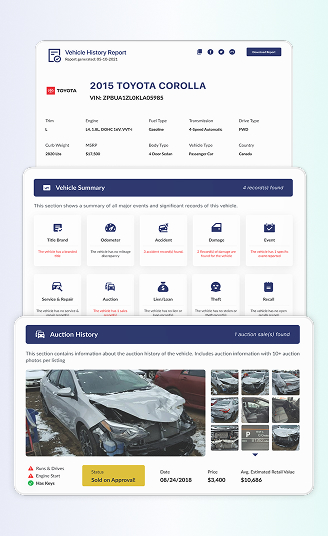

Check Geo Vehicle Details with VIN Decoder
Use our Geo VIN decoder to quickly identify your vehicle’s model year, engine, trim, and factory details. Upgrade anytime to access full history records, including accidents, mileage, and ownership data.
What is the Geo VIN Decoder?
A Geo VIN decoder is a tool that reads the 17-digit Vehicle Identification Number (VIN) and reveals the vehicle’s original factory specifications. Every Geo VIN contains encoded details about the vehicle’s engine, trim, drivetrain, body style, model year, and production plant.
A Geo VIN number is the unique identification code assigned to every Geo vehicle. Most vehicles built in the modern era use a 17-character VIN made of letters and numbers that stays with the vehicle for its entire life.
Geo vehicles were originally sold under the Geo brand by General Motors between 1989 and 1997, and later, many models continued under the Chevrolet name. Because of this history, decoding a Geo VIN can sometimes feel confusing. PremiumVIN makes it easier.
Our Geo VIN decoder lookup tool can read modern 17-digit VINs and even classic Geo VIN numbers with 5–14 digits, showing important information such as specifications, accident records, sales listings, and ownership history.
What Information Can You Get From a Geo VIN Number?
A Geo VIN decoder helps reveal important factory details about the vehicle using the 17-digit VIN number. Each VIN contains information that identifies the vehicle’s manufacturer, model, engine type, trim level, production year, and factory build details.
By decoding a Geo VIN, you can access information such as:
Manufacturer and Model Information
Manufacturer Details
Verify that the VIN belongs to Geo and confirm manufacturer information under General Motors (GM). Common WMIs include 2C1 (Geo built by GM), 1Y1 (Geo Prizm / Toyota collaboration), 2CN (Geo Metro / Suzuki collaboration), and 2CK (Geo Tracker / Suzuki collaboration).
Model Information
Identify the exact Geo model, such as Metro (subcompact hatchback/sedan), Prizm (compact sedan – Toyota Corolla clone), Tracker (compact SUV – Suzuki Vitara clone), Storm (sports coupe – Isuzu Impulse clone), Spectrum (subcompact sedan – Isuzu Gemini clone), or Sprint (subcompact hatchback – Suzuki Cultus clone).
Engine and Transmission Specifications
Engine Specifications
View engine type, displacement, horsepower, and fuel type.
Transmission Details
Verify the original transmission configuration (5-speed manual, 3-speed automatic, or 4-speed automatic).
Drivetrain and Body Style
Drivetrain
Check whether the vehicle is FWD (Front-Wheel Drive) or 4WD (Four-Wheel Drive) which available on Tracker.
Body Style
Confirm the body configuration (2-door hatchback, 4-door sedan, 4-door hatchback, 2-door convertible, 2-door SUV, 3-door coupe).
Production Details
Model Year
Verify the production year encoded in the VIN. Geo models were produced from 1989 through 1997.
Assembly Plant
See where the vehicle was manufactured. Geo’s assembly plants include:
Tarrytown, New York, USA – some Geo models (GM assembly)
Fremont, California, USA (NUMMI) – Geo Prizm (Toyota-GM joint venture)
Inebu, Japan (Suzuki) – Geo Metro, Sprint
Hamamatsu, Japan (Suzuki) – Geo Tracker
Fujisawa, Japan (Isuzu) – Geo Storm, Spectrum
Factory Specifications
Review original manufacturer build details.
How to Decode a Geo VIN Number
Decoding your Geo VIN is simple and takes less than a minute. Whether you own a Metro daily driver or a Tracker weekend project, the process is the same.

Step 1: Find Your VIN
Find the 17-digit VIN number on the vehicle dashboard, driver-side door jamb, or registration documents.

Step 2: Enter the VIN
Type or paste the full Geo VIN into the decoder tool above.

Step 3: Access Factory Specifications
Instantly view the vehicle's factory specifications, including engine, trim, transmission, and model year.
How to Read a Geo VIN Number
Every Geo vehicle carries a unique VIN that contains important information about its origin and configuration. Modern vehicles usually follow the 17-character VIN format regulated by vehicle identification standards.
The VIN is divided into three sections: WMI, VDS, and VIS. Together, they identify the manufacturer, vehicle characteristics, and the specific production sequence.
WMI (World Manufacturer Identifier)
The WMI is the first three characters of the VIN. This section identifies the manufacturer and region associated with the vehicle. For Geo vehicles, the WMI often reflects the General Motors manufacturing group or partnerships with other manufacturers during the Geo production era.
WMI Character Meaning (Example WMI: 2C1)
- 1st character: 2 = Country or regional manufacturing code
- 2nd character: C = Manufacturer grouping within the VIN system
- 3rd character: 1 = Brand identifier associated with Geo vehicles
This section helps confirm whether the VIN belongs to a genuine Geo vehicle before deeper decoding begins.
VDS (Vehicle Descriptor Section)
The VDS usually covers characters 4 through 9 in the VIN. This section describes important vehicle characteristics such as body style, engine type, model series, and other configuration codes. The Geo VIN decoder reads these characters to identify the vehicle’s design and equipment details.
VDS Character Meaning (Example VDS: MR226)
- 4th character: M = Part of the vehicle descriptor coding
- 5th character: R = Model or configuration code
- 6th character: 2 = Body or equipment identifier
- 7th character: 2 = Engine or drivetrain code
- 8th character: 6 = Additional configuration identifier
- 9th character: Check digit used to validate VIN accuracy
VIS (Vehicle Identifier Section)
The VIS covers characters 10 through 17. This part identifies the vehicle’s production details, such as model year, assembly plant, and serial number. A Geo VIN lookup uses this section to identify the exact vehicle and distinguish it from other vehicles produced in the same model year.
VIS Character Meaning
Example VIS: S123456
- 10th character: S = Model year code
- 11th character: Assembly plant identifier
- 12th–17th characters: Unique serial number assigned during production
These characters ensure that each Geo vehicle has its own unique identity within the manufacturer’s production system.
Supported Geo Models
Different Geo models may have slightly different VIN characteristics depending on the production year and manufacturing partnership. PremiumVIN Geo VIN decoder can decode VIN numbers for many Geo vehicles, including classic models with shorter VIN formats. Here are several examples of Geo models that people frequently search for:
Metro
Prizm
Spectrum
Sprint
Storm
Tracker
Why Users Trust Our Geo VIN Decoder
Many people run a Geo VIN lookup before buying or selling a vehicle. Trust matters when reviewing vehicle records, which is why our decoder focuses on reliable data sources and clear reports.
Most comprehensive database coverage
Our Geo VIN decoder collects information from multiple automotive databases, helping users see a wider range of vehicle records connected to the VIN number.
High accuracy, cross-checked results
Each VIN report is cross-referenced with multiple data sources to reduce errors and improve the reliability of the vehicle history information.
Daily data updates
Vehicle records are updated regularly, so users receive the most recent information available when performing a Geo VIN check.
24/7 customer support
Customer support is available at all times to help users understand VIN reports or answer questions about decoding results.
Live Chat with VIN Expert
If something looks confusing in the report, users can connect with a VIN expert through live chat for additional explanation.
Downloadable PDF
Reports can be saved as downloadable PDF files, which makes it easier to store records or share them with buyers and sellers.
Who Should Use the Geo VIN Lookup Tool?
A Geo VIN lookup is useful for more than just mechanics or vehicle experts. Anyone who is buying, selling, restoring, or collecting Geo vehicles can benefit from decoding the VIN first. A simple Geo VIN number decoder can reveal hidden records and production details that help people make smarter decisions before money changes hands.
Buying a used Geo vehicle can feel exciting, but also a bit uncertain. Sellers might describe the car in a certain way, but the real story often sits inside the VIN records. A Geo VIN decoder helps buyers verify whether the vehicle’s specifications, mileage, and history match what is being advertised.
Identify hidden damages before purchase
A Geo VIN lookup can reveal reported damage records, auction notes, or title brands that might not appear in a seller’s description.
Verify the Geo VIN authenticity
The decoder helps confirm that the VIN is valid and belongs to an authentic Geo vehicle rather than a mismatched or altered identification number.
Avoid unexpected financial problems
A Geo VIN lookup can identify existing liens or loan records, helping buyers confirm the vehicle can be legally transferred.
For sellers and dealers, transparency builds confidence. When buyers can see verified VIN information, they often feel more comfortable moving forward. A Geo VIN report provides documentation that supports the vehicle’s value and helps sellers answer buyer questions clearly.
Reduce buyer hesitation
When buyers can see verified historical information, they often feel more confident about continuing the negotiation.
Improve trade-in evaluations
Dealers often rely on VIN decoding to estimate trade-in values and review the vehicle’s history before making an offer.
Verify ownership history
Understanding previous owners and registration locations helps sellers explain the vehicle’s background more accurately.
Geo vehicles may be compact economy cars, but many enthusiasts enjoy restoring and collecting them. Some collectors search for rare trims, early models, or well-preserved examples. A Geo VIN decoder for collectors helps verify authenticity and production details before restoration projects begin.
Verify production year
The Geo VIN number decoder identifies the manufacturing year, which helps confirm whether the vehicle matches historical records.
Compare similar Geo models
VIN decoding helps enthusiasts compare different models, trims, and production years when searching for a specific variant.
Support resale value later
Well-documented vehicles with VIN records often attract more interest from collectors and buyers.
Need More Than Specs? Get a Full Geo Vehicle History Report
A quick Geo VIN decoder can tell you basic things about the vehicle, but the PremiumVIN Geo VIN check goes further. When you decode Geo VIN numbers through our system, the report gathers verified data from multiple automotive records and databases.
Vehicle Specifications
Use the specifications section to confirm that the Geo you are viewing matches its original factory build. It helps verify the model, engine, trim, and body style so buyers can spot listing errors, swapped parts, or incorrect seller claims early.
Year, Make, Model
This section confirms the official production year, the Geo brand identification, and the exact model name. It ensures that the vehicle matches its advertised model and helps verify authenticity for buyers and collectors.
Trim
Some Geo vehicles were released with different trims and option packages depending on market demand. The Geo VIN number decoder identifies these variations so users understand the original factory configuration.
Engine Information
Engine details are often included in the VIN decoding process. The report shows engine type, displacement, and sometimes fuel system information. This helps confirm that the engine installed matches the vehicle’s original build.
Odometer Records
Mileage accuracy is very important when evaluating older Geo vehicles. The Geo VIN decoder for collectors reviews mileage records from multiple sources.
Mileage History from Multiple Sources
Recorded mileage entries from inspections, registrations, and service visits are gathered and displayed in chronological order.
Rollback Detection and Alerts
If mileage suddenly drops between records, the report flags this as a possible odometer rollback.
Annual Usage Patterns
By comparing mileage entries over time, the report shows whether the vehicle was driven regularly or stored for long periods.
Recorded Inspection Mileage
Inspection records often contain mileage readings that help confirm whether the odometer history is consistent.
Lien / Loan Records
When a vehicle is financed, lenders may place a lien on the title. The Geo VIN lookup report helps identify these financial claims.
Lien Record Identification
This section shows whether a bank or financing company recorded a lien against the Geo vehicle.
Dates and Locations
Lien records usually include the date when the financial claim was recorded and the location where the lien filing occurred. These details help confirm the validity of the record.
Verified Sources
The report gathers lien data from verified vehicle registration databases and financial reporting systems.
Loan Status Indicators
Some records provide indicators about whether the loan might still be active or already released. This information is important when confirming that the vehicle can be legally transferred to a new owner.
Accident History
Accidents can affect safety, value, and insurance costs. The Geo VIN decoder report summarizes accident information connected to the VIN.
Number of Accidents Reported
This section lists the total number of accidents recorded for the Geo vehicle. Knowing how many incidents occurred helps buyers better evaluate the vehicle’s past condition.
Date of Reported Accidents
Knowing when accidents occurred helps determine whether the damage was recent or happened years earlier.
Reported Accident Location
Locations where accidents occurred sometimes appear in the VIN report, adding context to the event.
Damage Severity Indicators
Certain accident records may include notes describing the level of damage reported at the time of the incident. These details help users better understand the seriousness of the accident.
Damage Check
Damage history goes beyond accident reports. The Geo VIN number decoder also searches for environmental and structural damage indicators.
Fire Damage
Fire damage records indicate whether the vehicle experienced a fire incident. Fire damage can weaken structural components and electrical systems, making it an important detail for buyers to review.
Flood Damage
Flood records are especially important because water damage can affect electronics and mechanical components.
Dent and Scratch Damage
Minor cosmetic damage may appear in certain reports, especially from auction records.
Hail Damage
Hail events can create widespread body damage that may not always be visible during inspection.
Structural Damage
Structural damage refers to serious impacts that affect the vehicle’s frame or chassis. This type of damage can influence safety, stability, and long-term durability.
Recalls Check
Vehicle recalls occur when manufacturers identify safety defects or faulty components that require repair.
Open Recall Information
The report lists any recalls that still require repair. These unresolved recalls may affect vehicle safety and should be addressed before driving the vehicle regularly.
Completed Recall Events
Some recall repairs may have already been completed by authorized service centers. The VIN report may show these completed recall records.
Manufacturer and Safety Agency Notices
Recall notices may come from vehicle manufacturers or government safety agencies. These records provide official confirmation of safety concerns linked to the vehicle model.
Recall Repair Status
Some records indicate whether the recall repairs were successfully performed. This helps buyers understand if safety issues were already addressed.
Stolen Check
Vehicle theft records are another important part of the Geo VIN lookup report.
Stolen Status Check
The Geo VIN lookup tool checks national theft databases to determine whether the vehicle was reported stolen.
Recorded Theft Incidents
If theft reports exist, the VIN history may include details such as the location and date of the incident.
Recovery Records
Some reports also show whether the vehicle was recovered after a theft event and returned to lawful ownership.
Ownership Records
Ownership history helps explain how a Geo vehicle was used during its lifetime. The Geo VIN number decoder collects available registration and ownership records connected to the VIN.
Owner Count
This part shows how many individuals or businesses have owned the vehicle since it was first registered.
Ownership Timeline
The report tracks ownership changes across years, helping buyers see whether the Geo vehicle changed hands frequently or remained with one owner.
Vehicle Use Type
The report may indicate whether the vehicle was used for personal transportation, commercial activity, or fleet operations.
Service & Maintenance Records
Maintenance history can reveal how carefully the vehicle was maintained by previous owners.
Scheduled Maintenance
Routine services such as oil changes, brake inspections, and scheduled maintenance visits may appear in the VIN report timeline.
Part Replacements
Major components replaced during maintenance visits, such as alternators or suspension parts, may appear in service records.
Major or Minor Repairs
Repair history entries help identify mechanical problems that occurred during the vehicle’s lifetime.
Notes from Inspections
Inspection notes sometimes include comments about wear conditions, safety concerns, or recommended repairs.
Emission or Safety Checks
Some records include emission testing results or safety inspection reports completed during registration renewals.
Auction History
Many used vehicles appear in auctions before being sold through dealerships or private listings.
Auction Date and Location
Auction records may show when the Geo vehicle appeared in an auction and where the listing was held.
Sale Price
Auction price records help buyers understand the previous market value of the vehicle.
Condition Notes
Auction listings often include notes describing the vehicle’s condition, including primary or secondary damage.
Running Condition
Some auction records indicate whether the vehicle started, ran, or required repairs at the time of sale.
Auction Photos
Certain auction listings include photographs showing the vehicle’s condition when it was listed.
Free Geo VIN Decoder vs Full Vehicle History Report
Many people start with a Geo VIN lookup to verify a vehicle’s identity. If the car looks promising, they often continue with a premium report to see accident records, ownership history, and other important events.
| What You Can Check | Free Geo VIN Decoder (Quick Check) | Premium Geo Vehicle History Report (Full Report) |
|---|---|---|
| Geo year, model, and make | ✓ Confirms basic identity | ✓ Fully confirmed with production details |
| Basic Geo specs (engine, body, trim) | ✓ General specifications | ✓ Complete factory specifications |
| Title status (e.g., salvage, rebuilt, lemon) | Basic status hint only | ✓ Full title brand history |
| Accident history check | Not available | ✓ Detailed accident records when reported |
| Mileage and odometer records | Not available | ✓ Multiple recorded mileage entries |
| Odometer rollback/mileage inconsistency checks | Not available | ✓ Rollback flags and inconsistency alerts |
| Auction history and photos | Not available | ✓ Auction listings and images when available |
| Online listings and advertised sales | ✓ Current listing snapshot (when available) | ✓ Listings and advertised sales records |
| Timeline of previous listings and sales | Not available | ✓ Timeline of past listings and sale activity |
| Sales listings records & photos | Not available | ✓ Listing records and photos (when available) |
| Geo market value estimate | Not available | ✓ Value estimates and pricing ranges |
| Number of previous owners | Not available | ✓ Owner count (when available) |
| Past vehicle use (private, rental, fleet, commercial) | Not available | ✓ Use-type indicators when reported |
| Outstanding loans or lien records | Not available | ✓ Lien/loan flags when reported |
| Stolen vehicle check | Limited check | ✓ Detailed theft records if reported |
| Flood, fire, or hail damage indicators | Not available | ✓ Damage-event indicators when reported |
| Reported service or repair history | Not available | ✓ Service/repair records (when available) |
| Recall and warranty information | Limited overview | ✓ Recall history and basic warranty status |
| Downloadable PDF report | X Not included | ✓ Yes, easy-to-save PDF |
| Best suited for | Quick Geo VIN lookup and early screening | Buyers, sellers, collectors, and serious checks |
Case Study: Why Cecilia Checked a Geo VIN Before Buying
A Geo vehicle may look simple, but its history can be complex. A Geo VIN decoder allows you to verify key details such as specifications, ownership history, title status, and recorded events.
By running a Geo VIN lookup, buyers can reduce risk, sellers can support transparency, and collectors can confirm authenticity. It is a quick step that provides clarity before making any decision.
Sample Report: 1Y1SK5366PZ074203
Initial Impression
Cecilia was considering a 1993 Geo Prizm sedan with a 1.6L engine. The vehicle appeared clean and well-presented.
Before proceeding, she performed a Geo VIN check using VIN 1Y1SK5366PZ074203 to confirm the vehicle’s background.
Critical Findings
- No accident records were found in the available databases
- No major title brands, such as salvage, flood, or lemon, were reported
- No mileage discrepancies were detected in the odometer records
- Three ownership records were identified, with long-term ownership by the first owner
- Sixteen service and repair records were recorded over time
- One historical lien or loan record was reported from 1995
- One damage-related record was present, without an indication of major structural issues
Outcome
For Cecilia, the report answered the main buying question: was this older Geo reasonably consistent on paper? The answer was yes. No accident record, no major title brand, stable long-term ownership, and repeated service entries made the car easier to evaluate with confidence.
Lessons Learned
A Geo VIN lookup provides essential information that may not be visible during inspection.
In this case, decoding the VIN allowed Cecilia to verify the vehicle’s history and proceed with greater confidence. For any used Geo vehicle, running a VIN check is a practical and informed first step.
How to Get a Geo Vehicle History Report by VIN Number Lookup
Running a Geo VIN lookup is simple. You only need the VIN number from the vehicle. The process usually takes less than a minute.
Step 1: Enter Your VIN
Enter the Geo VIN into the PremiumVIN decoder search field. The system will begin decoding the vehicle’s identity and specifications automatically.
Step 2: Review the Preview
In seconds, you will see the free preview including the vehicle’s basic identity information, such as make, model, year, and engine details. This helps confirm the VIN was entered correctly.
Step 3: Get the Report
Once confirmed, generate the full Geo VIN history report to see accident records, ownership data, title brands, mileage history, and many other details.
Where to Find Geo Vehicle Identification Number?
If you are planning to run a Geo VIN check, the first step is locating the VIN itself. Most vehicles display the VIN in several places to make identification easier.
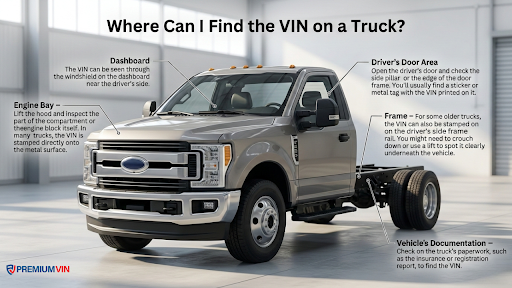
Dashboard
The VIN is usually visible through the windshield on the driver’s side dashboard. This is one of the easiest places to check.
Driver-side door frame
Open the driver-side door and look at the door jamb or frame. Many vehicles display a VIN label or plate in this area.
Vehicle registration documents
Official registration papers and insurance documents normally include the VIN number.
Engine bay
Some vehicles also stamp the VIN on the engine block or inside the engine compartment.
Vehicle title certificate
The legal vehicle title always includes the VIN number, which helps confirm the vehicle’s identity.
Explore Other Geo VIN Search Tools
If you are researching a Geo vehicle, you might want to explore a few additional tools as well. These tools can provide more detailed information about specifications, safety notices, and ownership history.
A Geo window sticker (monroney label) lookup shows the original factory sticker that came with the vehicle when it was new. It usually lists the vehicle’s MSRP, engine specifications, trim package, optional features, and fuel economy estimates.
A Geo recall check allows owners and buyers to see whether the vehicle has any safety recalls issued by the manufacturer or government safety agencies.
A Geo license plate lookup allows users to access vehicle information using the license plate number. It’s useful for confirming vehicle details when the VIN isn’t available, such as for online listings or parked cars.
A Geo title check will show the legal status of a vehicle, revealing title brands like salvage, rebuilt, or junk. This information is crucial for buyers as it impacts insurance coverage, resale value, and vehicle reliability.
Geo History and Key Facts You Should Know
Geo may not be as widely discussed today as some other brands, but it played an interesting role in the automotive industry during the late twentieth century. The brand was known for compact, affordable vehicles and partnerships between American and Japanese manufacturers.
The Brief History of Geo
Geo was launched by General Motors (GM) in 1989, and many Geo models were built through partnerships with Suzuki, Toyota, and Isuzu. That matters for VIN research because buyers often need to verify whether a vehicle is a true Geo-badged model, a related platform twin, or an older car with limited digital records.
Some interesting facts about Geo:
- The Geo Metro became known for excellent fuel efficiency during the 1990s
- The Geo Tracker was a compact SUV popular for off-road driving
- Several Geo models shared platforms with Japanese vehicles
- The brand was discontinued by General Motors in the late 1990s
Even today, many Geo vehicles remain on the road, which is why Geo VIN decoding continues to be useful.
Why Geo VIN Verification Matters
Japanese manufacturer identification – A Geo Metro is a Suzuki Swift. A Geo Prizm is a Toyota Corolla. A Geo Storm is an Isuzu Impulse. The VIN reveals which Japanese company actually built the car and it is essential for parts sourcing.
Parts compatibility – Knowing the true manufacturer (Suzuki, Toyota, Isuzu) allows you to source parts from the Japanese parent brand, often cheaper than GM-branded parts.
Discontinued brand (1989-1997) – Geo no longer exists, and records can be harder to find. VIN check helps fill gaps.
NUMMI-built Prizm – The Geo Prizm was built at the famous NUMMI plant (Fremont, CA) a joint venture between GM and Toyota that later became Tesla’s first factory. VIN reveals this unique heritage.
Collector interest – Clean, low-mileage Geo Metros and Trackers have developed a cult following. VIN documentation supports collector value.
Decode Your Geo VIN Now
Enter your Geo VIN to confirm the vehicle’s identity, factory details, and available history records in seconds. Start with a free lookup, then move to the full report if you need title checks, mileage history, accident records, liens, or ownership details before you buy.
Frequently Asked Geo VIN Questions
What is a Geo VIN Lookup?
A Geo VIN lookup is an online tool that allows you to enter a VIN number into a decoder tool and retrieve information about the vehicle’s specifications and recorded history. Our PremiumVIN Geo VIN decoder processes the VIN automatically and displays the vehicle’s identity details within seconds.
What details can I get from a Geo VIN Lookup?
A Geo VIN lookup can reveal the vehicle’s model year, engine type, body style, manufacturing plant, and trim level. A full Geo VIN history report may also include accident records, title brands, mileage history, and ownership data.
Can a Geo VIN Lookup identify the engine and trim level?
Yes. When you decode a Geo VIN, the VIN characters can reveal engine configuration and trim information depending on the model year and production details recorded by the manufacturer.
Does a Geo VIN Lookup show recall information?
A VIN lookup may identify recall notices issued for certain Geo models. A full VIN history report can provide more detailed recall information and indicate whether recall repairs were completed.
Is a Geo VIN Lookup available for older Geo models?
Yes. PremiumVIN supports VIN decoding for modern 17-digit VINs as well as vintage Geo vehicles with shorter VIN formats used before standardized VIN rules were widely adopted.
Do I need to register to use a Geo VIN Lookup?
No. Users can run a Geo VIN decoder search directly without creating an account. Registration is not required for basic free VIN decoding checks.
What is a VIN, and why is it important?
A VIN (Vehicle Identification Number) is a unique code assigned to every vehicle during production. It works like a fingerprint for the vehicle and allows databases to track specifications, registration records, and other events connected to that car.