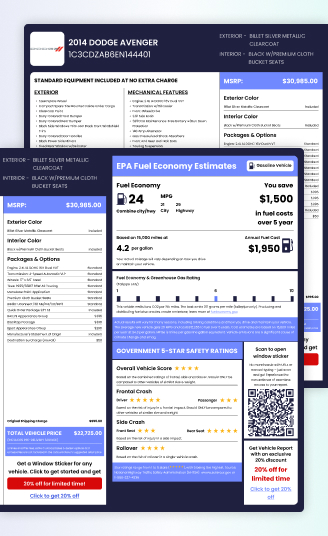

Peterbilt Window Sticker Lookup by VIN - Get Original Specs & MSRP
Are you buying, selling, or maintaining a Peterbilt truck? Don’t rely on guesswork. Get the Peterbilt window sticker by VIN to see the truck’s exact original factory specifications, features, and pricing. Our Peterbilt window sticker lookup tool makes it fast and easy to get the definitive build data you need.
What Is a Peterbilt Window Sticker by VIN?
A Peterbilt window sticker by VIN is an official document that outlines the truck’s factory specifications, features, pricing, and equipment based on its unique 17-digit Vehicle Identification Number. It includes details such as standard and optional features, engine configuration, transmission type, GVWR, wheelbase, and more.
This helps owners and buyers verify the exact build and configuration of any Peterbilt unit.
What You Can Find on a Peterbilt Window Sticker
The window sticker provides comprehensive details about the truck’s original configuration.
Standard Equipment
This section lists the features included in the base price of the Peterbilt model, such as cab type, standard suspension, and braking systems.
Manufacturer’s Suggested Retail Price
This is the original base price of the truck before any optional equipment, taxes, or destination charges were added. It serves as the baseline for determining current market value. Check original MSRP by VIN to verify factory pricing.
Optional Equipment
Lists add-ons or upgrades chosen at the time of ordering the truck, such as premium interiors, auxiliary power units, upgraded suspension, chrome packages, and advanced dash systems. Check factory options by VIN to confirm installed packages and features.
Engine and Transmission:
Get the precise, factory-installed engine model (e.g., PACCAR MX-13, Cummins X15), its horsepower, and torque ratings. You’ll also see the exact transmission model (e.g., Eaton Fuller manual, PACCAR automated manual) and the number of speeds.
Wheelbase and Tire Specs:
Provides wheelbase length, axle types, tire size, tire configuration, and other important specifications related to truck stability and load capacity.
GVWR (Gross Vehicle Weight Rating):
This critical safety and operational detail specifies the maximum operating weight of the fully-loaded truck, as determined by the manufacturer.
Why Do You Need a Peterbilt Window Sticker?
Window stickers are extremely valuable for anyone involved in the commercial truck market.
For Buyers
Know what you’re paying for
No more guessing what the seller thinks the truck has. The sticker lists every original feature and option.
Spot modifications easily
Compare the sticker details to what’s actually on the truck. You’ll instantly notice if parts have been changed or added.
Understand true value
The original MSRP and equipment help you know if the asking price is fair or inflated.
For Sellers
Build buyer confidence
A sticker looks professional and honest. It tells buyers, “I’ve got nothing to hide.”
Speed up sales
Buyers make quicker decisions when they see all the factory details upfront.
Justify your asking price
You can easily explain why your Peterbilt costs more—because it’s got premium options or an upgraded package.
How to Get the Original Peterbilt Window Sticker by VIN?
Obtaining your Peterbilt’s Monroney label is quick and secure. Here’s how:
Enter the VIN
Locate and input your 17-digit Peterbilt VIN into the form. This unique identifier ensures precise results.
Submit Your Request
Click the “Get a Window Sticker” button to preview your sticker.
Receive Your Sticker
Complete the payment process to download or print your window sticker.
Save, Print, or Share
Use your digital sticker for personal records, resale listings, or dealership documentation.
Where to Find Your Peterbilt VIN?
To use our Peterbilt window sticker lookup tool, you’ll need the truck’s 17-character VIN. Here are the most common places to find it on a Peterbilt:
Driver’s Side Dashboard
Look through the windshield on the driver’s side at the base.
Driver’s Door Jamb/Aperture
Check the certification label or sticker located inside the driver’s door opening.
Frame Rail
On many heavy-duty trucks, the VIN (or a portion of the VIN, like the last 6-8 digits) is stamped on the left front frame rail, often near the steering box or just behind the front bumper.
Registration and Title Documents
The complete VIN will always be listed on your truck’s title, registration, and insurance papers.
Window Stickers for All Peterbilt Models
Our Peterbilt window sticker lookup tool supports a wide range of Peterbilt models across vocational, on-highway, classic, and vintage segments. PremiumVIN can decode both modern 17-character VINs and classic Peterbilt VINs with shorter formats (5-14 digits), making it essential for collectors and restorers of vintage trucks.
Here are popular Peterbilt models you can decode with PremiumVIN. Don’t see yours? We support all Peterbilt variants and model years, too.
389
579
567
365
367
389X
537
520
535
548
389 Pride
389 Class Edition
587
388
384
352
3300
386
320
330
340
379 (Classic)
377
378
385
359
210
220
325
260
348
350
3500
351
281
282
288
1100
200
2100
250
2600
2700
2800
2900
3000
3100
3200
Why Do You Need to Use Our Peterbilt Window Sticker Lookup Tool?
Our specialized tool is designed to deliver reliable, comprehensive factory data specifically for heavy-duty commercial trucks, like Peterbilt.
- Fast: Get the critical build information you need in minutes, not days. Stop waiting for manufacturer response times.
- Accurate: Our lookup pulls data directly from reputable databases that contain verified manufacturer build sheets, ensuring the specs are correct and complete.
- Helpful: The sticker helps with resale value, equipment verification, insurance documentation, and fleet management.
- Expert Support: Our support team is always ready to guide you with VIN decoding or window sticker inquiries.
Get Your Peterbilt’s Original Window Sticker Today
Retrieve your truck’s full build information quickly and easily. Use our Peterbilt window sticker by VIN tool to access accurate factory-original specifications and pricing information.
Start your lookup now and get instant details on any Peterbilt truck.
Try Our Other Peterbilt VIN Tools
Quickly decode your VIN to reveal specifications, build details, and ownership history. The report includes factory data, accident records, title checks, and more.
Use our Truck VIN lookup to check any semi- and heavy-duty truck specifications, ownership, warranty, mileage records, and maintenance history.
FAQs About Peterbilt Window Sticker Lookup by VIN
Can I get a Peterbilt window sticker by VIN?
Yes. By entering your truck’s unique 17‑character VIN into our lookup tool, you can instantly generate the original Peterbilt window sticker. This document includes factory specifications, engine and transmission details, pricing details, GVWR (Gross Vehicle Weight Rating), and other key information about your truck.
Do I need the VIN to get a Peterbilt window sticker?
Not necessarily. The Vehicle Identification Number (VIN) is the most precise way to locate your truck’s window sticker because it is unique to every vehicle. You can also use your license plate number or the truck’s year, make, and model. The VIN provides the most accurate results, but these alternatives are useful if the VIN is not available.
Where can I find my Peterbilt truck’s VIN to do a window sticker lookup?
You can usually find your Peterbilt truck’s VIN on the driver’s side door frame, inside the glove box, or stamped into the frame rail. These are the most common locations, and checking them will help you quickly retrieve the number for a window sticker lookup.