

What is a Window Sticker on a Car?
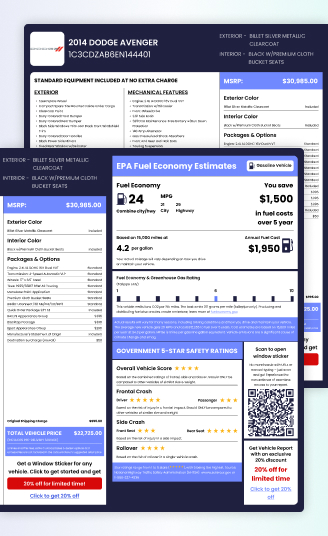
A window sticker on a car is a label that holds important information about the vehicle. It comes with a new vehicle from the manufacturer or dealership and can also be found on used vehicles.
The window sticker shows everything about the vehicle’s specifications and other features at a glance. Knowing how to read a window sticker will help you browse through a lot of vehicles in no time and pick the one with the best specifications and features at a reasonable price.
Why Was the Window Sticker Created?
Before 1958, dealers could set prices arbitrarily without disclosing the manufacturer’s suggested price. The Monroney label was designed to protect consumers by ensuring transparency in new car pricing and features.
What the Window Sticker Includes
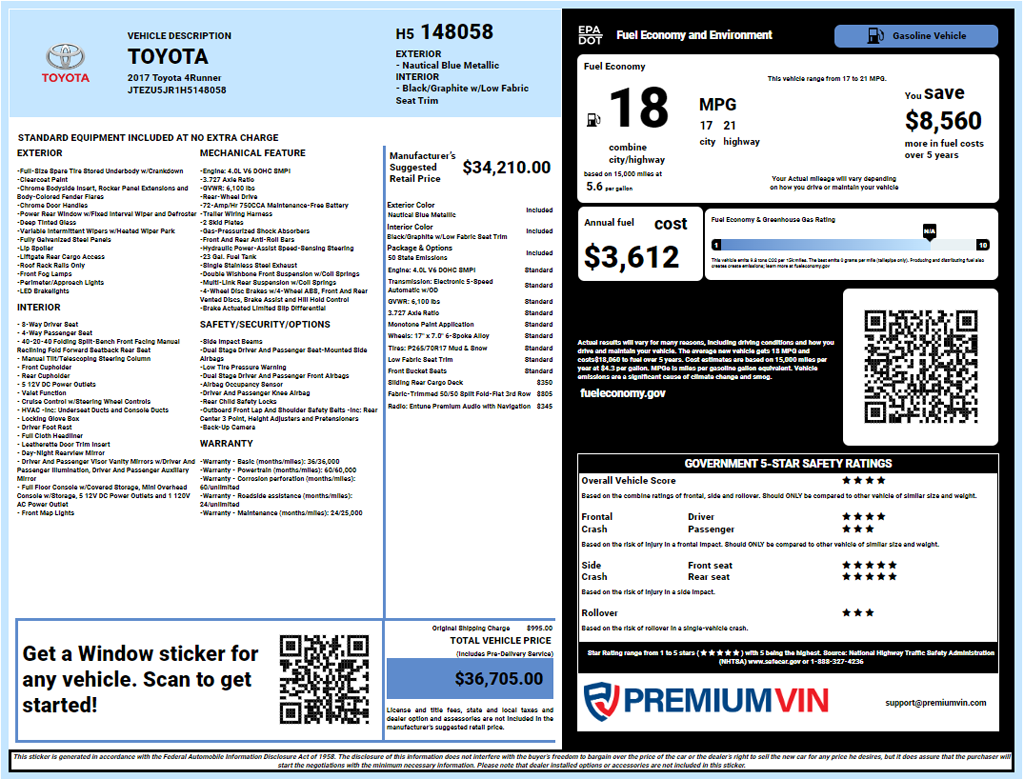
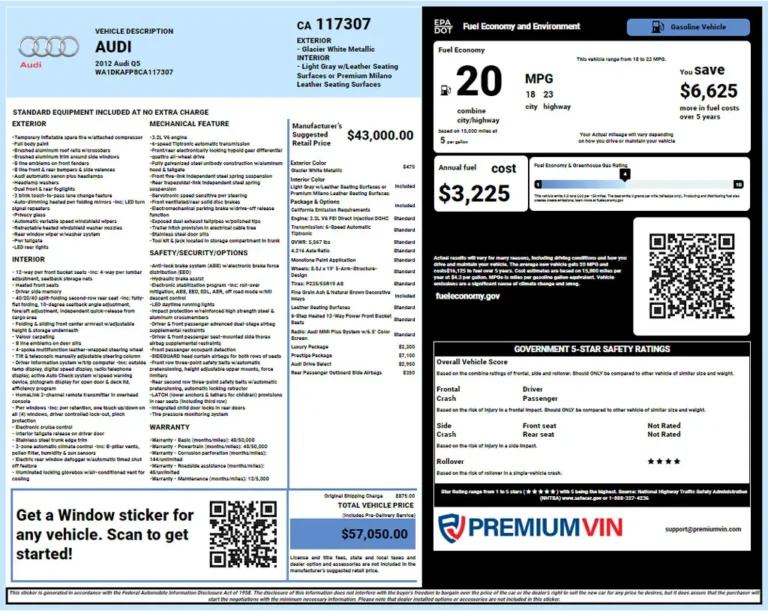
A window sticker helps buyers verify the build details of a vehicle and understand what was included at the time of purchase. While available information may vary by manufacturer, most factory window stickers include the following details.
Standard Features and Equipment
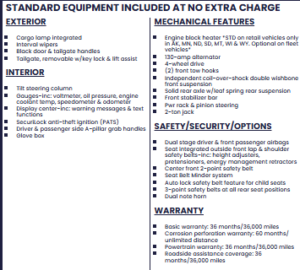
A window sticker lists the features included with the vehicle as it was built. Standard equipment includes safety features, interior technology, performance components, comfort features, and other factory-installed features included in the vehicle’s base configuration.
Options and Packages
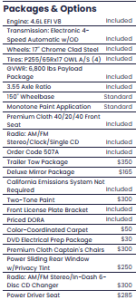
Options and packages include upgrades such as premium audio systems, navigation systems, advanced safety technology, appearance packages, towing packages, or luxury features.
Manufacturer’s Suggested Retail Price

The window sticker shows the pricing information assigned by the manufacturer. This allows buyers to understand the vehicle’s cost before depreciation, modifications, or resale. The MSRP section displays the base vehicle price along with the cost of selected options, packages, and other factory-added features.
Interior and Exterior Colors
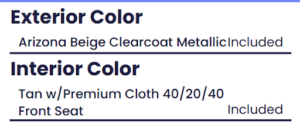
A window sticker records the colors and materials selected when the vehicle was manufactured. The sticker shows the exterior paint color, interior color, and upholstery materials chosen for the vehicle.
EPA Fuel Economy Ratings
Factory window stickers include official fuel economy information based on the vehicle’s original configuration. The EPA section shows estimated city, highway, and combined MPG ratings, along with fuel consumption information for applicable vehicles.
NHTSA Safety Ratings
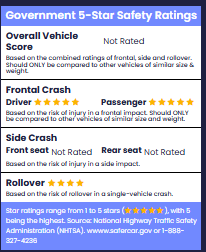
The window stickers include safety information from the National Highway Traffic Safety Administration (NHTSA). These ratings provide additional details about the vehicle’s crash safety performance.
Warranty Information
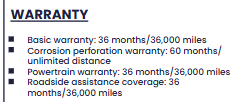
A factory window sticker may include warranty details available when the vehicle was originally sold. This information helps identify the manufacturer’s coverage terms. Warranty details may include bumper-to-bumper coverage, powertrain warranty, corrosion protection, and other manufacturer-backed coverage.
Total Vehicle Price
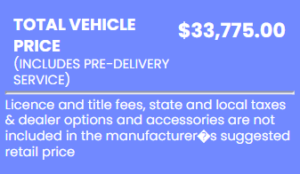
See the breakdown of the vehicle’s purchase price. This includes the base model cost, added options, packages, and additional factory charges. The total price section combines the MSRP, selected upgrades, destination charges, and other applicable fees included in the vehicle’s pricing.
Greenhouse Gas Ratings
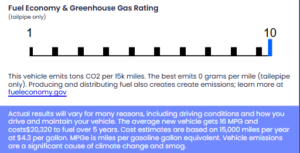
For applicable vehicles, the window sticker includes environmental information related to emissions and fuel efficiency. The greenhouse gas section shows CO₂ emissions ratings and environmental performance information based on EPA testing standards.
READ ALSO: How To Get a Build Sheet From VIN Number: Simple and Easiest Way
How to Get a Window Sticker
To get the window sticker, you may use the VIN to retrieve the window sticker and get the result in less than a minute. Follow these steps to get it done easily.
Step 1: Find the VIN
Examine the driver’s side door jamb, windshield, or documentation like registration or bill of sale.
Step 2: Enter the VIN
Visit PremiumVIN’s window sticker page and enter the VIN into the form.
Step 3: Get the Window Sticker
Check the preview page to see specs, MSRP, and market value. Then, proceed to payment to get the full window sticker.
Why Knowing How to Read a Window Sticker Matters
Understanding how to read a window sticker helps buyers, sellers, and vehicle owners verify important details about a vehicle’s original configuration. It provides a reliable reference for factory equipment, pricing, and specifications that may not be obvious from a visual inspection.
Verify Original Vehicle Equipment
A window sticker allows buyers and owners to confirm the exact features installed when the vehicle was built. This includes factory options, packages, trim details, and equipment that may affect the vehicle’s value.
Make Better Buying Decisions
Reviewing a window sticker helps buyers compare the original MSRP with the current asking price. It also helps identify whether a vehicle is priced fairly based on its original equipment and configuration.
Avoid Misleading Vehicle Descriptions
Some sellers may describe a vehicle as “fully loaded” or equipped with premium features. A window sticker provides the original factory details, making it easier to verify whether those claims match the vehicle’s actual build.
Support Vehicle Resale Value
For sellers, a window sticker provides documentation of factory-installed packages and upgrades. Vehicles with premium options, rare configurations, or higher original MSRP may be easier to market and justify at a higher price.
Keep Accurate Vehicle Records
Owners can use a window sticker to maintain records of their vehicle’s original specifications, including trim level, engine details, colors, and factory equipment. These records can be useful for insurance, maintenance, resale, or personal reference.
Read also: Missing Window Sticker? Here’s How to Replace It
How to Read Factory Options on a Window Sticker
A window sticker shows the exact options and packages installed on a vehicle when it was built. This section helps buyers understand which features were added beyond the standard equipment and how those upgrades affected the vehicle’s price.
Package Options vs. Individual Options
Factory options are usually listed as either packages or individual upgrades. Package options combine multiple features, while individual options add a specific feature separately.
Package Options
Packages group related features into one upgrade. For example, a Premium Package may include leather seats, upgraded audio, advanced safety technology, and additional convenience features.
Individual Options
Individual options are standalone upgrades added separately from a package. Common examples include a sunroof, upgraded wheels, towing equipment, special paint colors, or premium interior features.
How Option Codes Identify Factory Equipment
Many manufacturers use option codes to identify specific factory-installed equipment. These codes help track the exact configuration of a vehicle and may appear on the window sticker, build sheet, or manufacturer records.
Understanding Option Codes
Option codes can represent specific features, packages, or equipment groups. They are useful when verifying a vehicle’s original build, especially when comparing similar trims with different configurations.
Common Factory Options Found on Window Stickers
The factory options section may include a wide range of upgrades depending on the manufacturer, model, and trim level. These features can affect the vehicle’s original price and resale value.
Technology Packages
Technology upgrades include advanced infotainment systems, larger displays, navigation systems, wireless smartphone connectivity, and driver assistance features.
Comfort and Convenience Packages
Comfort-focused options may include heated and ventilated seats, premium climate controls, remote start, upgraded interior materials, and additional convenience features.
Performance and Appearance Packages
Performance and appearance upgrades include sport suspension, larger wheels, exterior styling packages, upgraded brakes, and unique design elements.
Why Factory Options Matter When Buying a Used Vehicle
Checking factory options can help you understand the important details during vehicle evaluation. If the vehicle is equipped with premium packages or rare factory options, it will obviously have a higher MSRP than a base model with the same trim.
How to Compare MSRP to a Used Car’s Asking Price
A window sticker helps buyers understand what a vehicle cost when it was new. Comparing the MSRP with the current asking price can show how much value the vehicle has lost over time and check whether the current asking price is reasonable.
Start With the MSRP
The total MSRP on the window sticker represents the vehicle’s original retail price, including the base model, factory-installed options, packages, and destination charges. This provides a starting point for comparing the vehicle’s past and current value.
Consider Depreciation Over Time
Most vehicles lose value as they age, but depreciation varies depending on the make, model, mileage, condition, and market demand.
For example, a vehicle with an MSRP of $40,000 that is now listed for $20,000 has lost approximately 50% of its value. Whether that depreciation is normal depends on similar vehicles in the same market.
Compare Similar Vehicles
A fair price comparison should include vehicles with similar factors, such as model year, mileage, trim level, condition, and equipment. Two vehicles that look identical may have different values if one includes additional factory options or premium packages.
Account for Factory Options and Packages
Factory-installed options can significantly affect a vehicle’s original price and resale value. A model equipped with premium packages, advanced technology, or upgraded features may be worth more than a base version with the same year and mileage.
Why You Should Consider a Window Sticker Lookup
Purchasing a used vehicle can be incredibly difficult, and you would have to move a mountain to know if the pre-owned vehicle you’re considering has all the options and features you are looking for. If you ask a dealer for a copy of the window sticker, don’t be surprised if they give you an astonished look. It’s rare to get the window sticker for a pre-owned vehicle.
If you are a potential buyer, getting a window sticker will let you know all the features available for the car you are searching for. Also, for a seller, it would be a simple way to find detailed information about the vehicle that you want to advertise or forward to potential buyers. Some of the major reasons to get a window sticker include
- Accurate information on factory-fitted options
- Undervalue minimization
- Safety Recall information
- Code Guide information
So, Got an Idea of How to Read a Window Sticker?
Knowing how to read a window sticker makes it easier to understand a vehicle’s configuration, equipment, and pricing. The sticker can confirm factory options, explain the original MSRP, and provide useful details when comparing a used car with similar models.
As a buyer, it is important to verify the seller’s claim and to help you avoid paying more for features that the vehicle does not even have. When the original sticker is missing, a window sticker lookup by VIN can provide an alternative way to access available factory information and keep a useful record of the vehicle’s original build.