

Key Takeaways
- A build sheet records a vehicle’s original factory configuration and production information.
- A VIN identifies the vehicle but does not itself contain the complete build sheet.
- Manufacturer records, dealerships, brand-specific resources, and VIN lookup services can help retrieve factory information.
- Build sheets and window stickers provide different types of vehicle information.
- Comparing factory records with the current vehicle can help identify equipment and possible modifications.
A Vehicle Identification Number can be used to retrieve a vehicle’s build sheet and check the car’s initial build information. A build sheet is paperwork that comes with the car when it was sold new; however, some people throw it away.
If the original build sheet is missing, you can run a quick build sheet lookup by VIN to find the car’s initial build details. This guide explains the easiest way to get a build sheet by using the VIN, see what’s available on the build sheet, and why you need to get the document.
What is a Vehicle Build Sheet?
A vehicle build sheet is a factory records document that shows how a vehicle was configured during the production period. The build sheet usually includes crucial information about the vehicle, such as the vehicle’s trim, engine, transmission, factory-installed options, packages, colors, production codes, and other original specifications.
The information available in a build sheet can vary by manufacturer, vehicle, and model year. Some manufacturers provide detailed production records, while others may offer only limited factory information. Older vehicles may also have fewer records available than newer models.
READ ALSO: How to Check If My Car is Marked By the Police?
Can You Get a Build Sheet From a VIN?
A VIN can be used to identify a specific vehicle and retrieve associated factory information. However, you cannot rely on a VIN alone to determine detailed build details of the vehicle.
Whether a build sheet or similar factory record is available depends on several factors, including:
Manufacturer
Each manufacturer stores and provides factory records differently.
Model Year
Newer vehicles may have more accessible digital records, while older records can be harder to find.
Vehicle Type
Available information can differ between passenger cars, trucks, SUVs, and other vehicles.
Production Records
A build sheet can only be retrieved if the relevant factory information still exists.
Record Access
Some manufacturers may restrict access to certain production records or require additional verification.
What Does the VIN Tell You?
A VIN contains standardized information that helps identify a specific vehicle. Its characters can indicate the manufacturer, vehicle attributes, model year, assembly information, and production sequence.
However, the VIN does not normally encode every factory option or piece of equipment installed on the vehicle. Information such as specific packages, optional equipment, and factory configuration.
How to Get a Build Sheet by VIN
To get a build sheet by VIN, you can use PremiumVIN’s build sheet service and follow these steps to get it done in seconds.
Step 1: Find the VIN
Check the driver’s side door jamb, engine bay, or the vehicle’s paperwork, such as insurance, title, or registration.
Step 2: Enter the VIN
On the page, click the form and enter the VIN you want to check. Then, click the button to submit the form.
Step 3: Get the Build Sheet
Examine the preview page where you can see the vehicle’s specs, MSRP, and market value. Then, proceed to payment to secure the build sheet.
How to Find Your Build Sheet by Brand
The process for finding factory build information varies by manufacturer. Some brands provide owner portals or historical records, while others require a dealership, specialized archive, or VIN-based lookup service.
Chrysler, Dodge, Jeep, and Ram
For Chrysler, Dodge, Jeep, and Ram vehicles, check available manufacturer resources or dedicated VIN lookup services. Older vehicles may require additional research through brand-specific archives or enthusiast resources.
Ford
Ford owners can check manufacturer resources or contact Ford for available factory information. For many older Ford vehicles, Marti Auto Works may provide historical vehicle documentation and build information.
Toyota and Lexus
Toyota and Lexus owners can check their respective owner resources for available vehicle specifications and equipment information. Access and available details may vary by model and model year.
Other Vehicle Brands
For other makes, use a multi-brand VIN lookup service such as PremiumVIN to get the build sheet for any vehicle’s brand. Or, you may use the NHTSA VIN Decoder can also help decode a VIN, but it does not replace a complete manufacturer build sheet.
What Information Does a Build Sheet Contain?
A build sheet contains different types of factory information depending on the manufacturer, model year, and production records. If you want to buy a used car or do a restoration, you can use the build sheet to obtain the vehicle’s build details.
Vehicle Identification and Trim
A build sheet shows the vehicle’s make, model, model year, trim level, VIN-related details, and production or sequence information. These details help identify the vehicle’s original factory configuration.
Engine and Transmission
Factory build records include the engine, transmission, drivetrain, axle configuration, and other mechanical specifications. This information can help determine whether the vehicle’s current mechanical setup matches its original configuration.
Factory Options and Packages
A build sheet lists factory-installed options, equipment packages, appearance packages, technology features, convenience packages, and other optional equipment selected during production.
Colors and Interior Configuration
You can use the build sheet to identify initial exterior and interior colors, upholstery, materials, and interior trim codes. This information can help verify a vehicle’s actual appearance.
Production Information
Some build sheets include the vehicle’s build date, production codes, assembly details, or manufacturing plant. The availability of these details varies by manufacturer, model year, and vehicle.
Build Sheet vs. Window Sticker vs. Vehicle History Report
A build sheet, window sticker, and vehicle history report provide different types of vehicle information. Knowing the differences between these documents can help you get the information correctly. Take a look at the section below to see the differences between these three documents.
Build Sheet
A build sheet focuses on the vehicle’s factory configuration. It may show the trim, engine, transmission, factory options, packages, colors, and other production details available for that vehicle.
Window Sticker
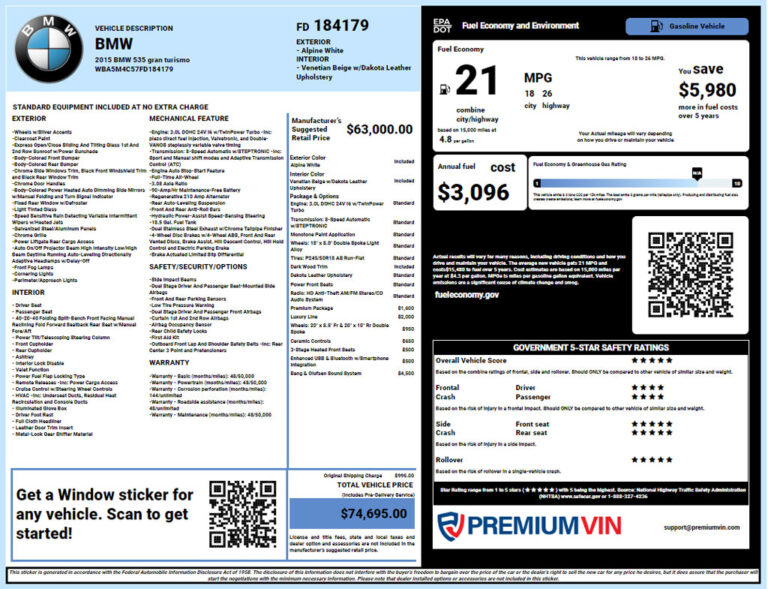
A window sticker provides consumer-facing information about a vehicle when it was new. It typically shows the MSRP, standard equipment, optional equipment, packages, destination charges, safety ratings, fuel economy, and more.
Vehicle History Report
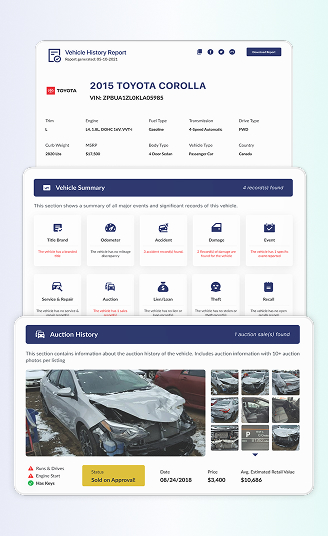
A vehicle history report focuses on events recorded throughout the vehicle’s history, such as title records, reported damage, accidents, mileage, ownership changes, and registration events. Combine the vehicle history report with the build sheet to get more vehicle information.
Why Should You Get a Build Sheet by VIN?
A build sheet can help verify a vehicle’s original factory configuration. Comparing this information with the vehicle can show its equipment, confirm advertised specifications, and provide useful details for buying, maintaining, or restoring a vehicle.
Verify Factory Equipment
Compare the build sheet with the vehicle’s current equipment to see whether features such as the engine, transmission, wheels, interior, and factory options match the configuration.
Confirm Trim, Packages, and Options
Factory build information can help verify the vehicle’s original trim level, packages, and optional equipment. This is useful when checking a seller’s description or determining whether specific features were factory-installed.
Identify Original Engine and Drivetrain
A build sheet identifies the engine, transmission, drivetrain, and other mechanical specifications installed during production. This information can help buyers, owners, and restorers verify the vehicle’s original mechanical configuration.
Check for Aftermarket Modifications
Comparing the factory configuration with the vehicle’s current equipment may reveal differences caused by aftermarket modifications, replaced components, or removed factory equipment. You can refer to the build sheet to determine if the vehicle was rebuilt while doing a manual inspection.
Support Classic Car Research and Restoration
The factory information can help classic car owners verify the vehicle’s trim, colors, equipment, and mechanical specifications. These details can also support restoration work to match the vehicle to its factory configuration.
Get Your Build Sheet by VIN Now!
A build sheet can be used as a reference document to get insightful information on how the vehicle was configured at the factory. While a VIN does not contain the complete build sheet, it can help retrieve associated factory information from available records. Buyers and owners can use this information to verify the trim, engine, transmission, options, packages, and other equipment.
If the build sheet is unavailable, VIN-based lookups, manufacturer records, window stickers, and other vehicle documents can help fill in the missing details.
FAQs on Getting a Build Sheet by VIN
Can I get a build sheet with a VIN number?
Yes, you may be able to retrieve a vehicle’s factory build information using its 17-character Vehicle Identification Number (VIN), depending on the manufacturer and available production records.
Can a VIN tell me the factory options?
A VIN can help retrieve information about factory options, but individual options are not necessarily encoded directly in the VIN. The available details depend on the manufacturer’s records and the VIN lookup service used.
Is a build sheet the same as a window sticker?
No, a build sheet is not the same as a window sticker. A window sticker is a consumer-facing document showing a vehicle’s original pricing, equipment, and options, while a build sheet focuses on its factory configuration and production information.
How accurate is a VIN build sheet?
Factory build records can provide highly accurate information because they document the vehicle’s original production configuration. However, the accuracy and completeness of an online VIN lookup depend on the quality and availability of the underlying records.
Can a build sheet show the MSRP?
No, a standard factory build sheet typically does not focus on the Manufacturer’s Suggested Retail Price (MSRP). A window sticker is generally a better source for the vehicle’s original MSRP and consumer-facing pricing information.