
Check Vehicle Specifications by VIN
Need to check your car’s specifications quickly? Use PremiumVIN’s vehicle specifications by VIN to get detailed information about the vehicle’s specifications, such as engine, body type, drive type, fuel type, and many more. Click on the form to begin.
What are Vehicle Specifications?
Vehicle specifications are technical details and factory information that describe how the vehicle was built. These vehicle specifications include the engine type, transmission, drivetrain, body style, fuel type, trim level, dimensions, and factory-installed equipment.
The manufacturer assigns these specifications to the vehicle during the production process, making it easier to track the original specifications. Finding a vehicle’s specifications using VIN is possible because getting the correct specifications is important to ensure it fits your needs, preferences, and budget.
What Vehicle Specifications Can Be Found by VIN?
By decoding the VIN, you can find the detailed vehicle specifications such as engine details, transmission, body type, fuel type, trim level, and factory equipment information. Here are some vehicle specifications you can check with the VIN:
Engine Information
A VIN specification lookup tool shows the important engine details such as engine size, displacement, cylinder count, fuel delivery system, and engine code. Be sure to check this section carefully to verify that the engine details are correct.
Transmission
Check the transmission information of the vehicle by using the VIN to verify if it uses an automatic, manual, or continuously variable transmission (CVT).
Trim Level
Not all trims are priced the same and have the same specifications. Check the specification details, compare features, and estimate the value.
Fuel Type
Use the VIN to identify the actual fuel type used by the vehicle, including gasoline, diesel, hybrid, plug-in hybrid, or electric powertrains. Knowing this information is useful when evaluating fuel requirements, operating costs, and vehicle efficiency.
Body Type
The PremiumVIN VIN lookup tool helps identify the vehicle’s body type, such as a coupe, convertible, SUV, sedan, or pickup truck. Depending on the vehicle, this can include classifications such as sedan, coupe, hatchback, wagon, SUV, pickup truck, van, or convertible, helping users accurately identify the vehicle’s design and intended use.
Factory Equipment by VIN
Check the detailed information about the vehicle’s factory equipment and vehicle features. This includes seating configurations, safety features, wheel specifications, interior options, technology packages, and other equipment originally installed when the vehicle was built.
How to Check Vehicle Specs by VIN
Checking a vehicle’s specifications by VIN can be done in less than a minute with PremiumVIN. Follow these simple steps to check any vehicle specifications.

Step 1: Enter the VIN
Check on the driver’s side doorjamb or the paperwork. Then, write the VIN on the form.

Step 2: Submit the Form
Click on the button to submit the form. You just need to wait for a few seconds to get the VIN generated.

Step 3: Check Vehicle Specs
Once it is done, you’ll see a page where you can examine the vehicle’s complete specifications like engine, body type, and market value.
Vehicle Specifications vs. Vehicle History
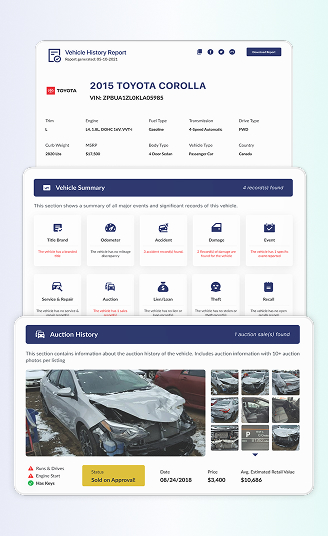
Vehicle specifications identify a vehicle’s original features and technical details, including its engine, transmission, trim, and body style. On the other hand, a vehicle history report focuses on the vehicle’s recorded past, helping users review ownership history, accident records, title brands, and other historical events.
Vehicle Specifications
The vehicle specification shows the engine type, transmission, drivetrain, trim level, fuel type, body style, dimensions, and factory-installed equipment. This is crucial to know before completing any transaction.
Vehicle History Report
A vehicle history report provides information about the vehicle’s past ownership and usage. Depending on the available records, the vehicle history report includes accident history, title records, salvage branding, odometer readings, registration events, theft records, recalls, and service history.
Engine Information
Check the past ownership history, such as the year of purchase, past location, and period of ownership. Also, you can see the past usage of the vehicle, whether it was used as a personal, leased, or rented car.
Accident History
See if the vehicle was involved in an accident. You can check the date and the accident location with the report.
Title Records
Verify if the vehicle has a clean title or carries a bad title like salvage, rebuilt, or lemon. Be sure to purchase a used car with a clean title history.
Odometer Reading
Check the detailed odometer history of the vehicle before you buy. You can check the odometer records along with the date and the last recorded mileage of the vehicle before it was put on sale.
Theft Records
Examine whether the vehicle was ever stolen. Check the theft information, like the date and location, and ensure that the vehicle has zero stolen records.
Recalls History
See the detailed recall history of the vehicle. You can find the date, causes, resolution, and the recall status, whether it’s still open or closed.
Service and Maintenance History
Check the maintenance and service history, such as the date, location, and which components were maintained/serviced. Always check the car’s maintenance history to see if the vehicle was properly maintained.
Warranty Records
Check the detailed warranty history of the vehicle. PremiumVIN’s vehicle history report shows detailed information on the duration of coverage from warranties like extended, roadside assistance, and more.
Why Do You Need to Verify a Vehicle's Specifications?
Verifying auto specifications by VIN is important to ensure the information you are getting is accurate. Whether buying, selling, owning, or insuring a vehicle, understanding the detailed specifications is important.
Buyer
Vehicle buyers can use VIN-based specifications to confirm that the vehicle matches the seller’s description and advertised features.
Verify Vehicle Listings
Check whether the engine, trim level, drivetrain, and other specifications match the information provided in the listing.
Compare Similar Vehicles
Use factory specifications to compare different models and trims before making a purchase decision.
Seller
Sellers can verify vehicle specifications to create accurate listings and provide potential buyers with reliable information.
Create Accurate Advertisements
Including verified specifications can help reduce confusion and ensure buyers understand exactly what is being offered.
Build Buyer Confidence
Providing factory-correct vehicle information can increase transparency and help buyers feel more comfortable during the transaction.
Owner
Vehicle owners can use specification data to better understand their vehicle and maintain it properly.
Purchase Compatible Parts
Factory specifications can help identify the correct components, fluids, tires, and accessories for the vehicle.
Understand Vehicle Capabilities
Knowing details such as engine size, drivetrain, towing capacity, and fuel type can help owners operate their vehicles more effectively.
Insurance
Insurance providers often rely on accurate vehicle information when calculating insurance coverage and fees.
Confirm Vehicle Details
Verified specifications help ensure the correct vehicle configuration is used when obtaining insurance quotes.
Support Policy Accuracy
Accurate information about the vehicle’s engine, trim, and equipment can help prevent discrepancies in insurance records.
Check Vehicle Specifications for Trucks, SUVs & Commercial Vehicles
Different vehicle types have unique specifications that affect performance, capabilities, and intended use. You can use our VIN specifications lookup to check the detailed specifications information on trucks, SUVs, and commercial vehicles.
Truck Specifications
You can use our service to get detailed information about the truck specifications, such as:
- Engine size
- Drivetrain
- Cab configuration
- Bed length
- Towing capacity
- Payload ratings
SUV Specifications
The SUV specifications include complete information about the car, such as:
- Engine
- Seating capacity
- Drivetrain
- Cargo space
- Trim levels
Commercial Vehicle Specifications
Use our service to look up information, such as the gross vehicle weight rating (GVWR), chassis type, fuel type, wheelbase, and manufacturer information. Businesses and fleet operators often use these specifications to verify vehicle capabilities and operational requirements.
Look Up Vehicle Specifications For EV and Hybrid Vehicles
Electric and hybrid vehicles have unique powertrain characteristics that differ from those of traditional gasoline or diesel vehicles. PremiumVIN’s vehicle specification by VIN can help with getting the actual specifications for any EV or hybrid vehicle.
EV Specifications by VIN
See complete information about the car, which shows its specifications. These help buyers or owners to understand the vehicle’s performance.
- Battery capacity
- Motor configuration
- Drivetrain layout
- Charging capabilities
- Estimated driving range
Hybrid Vehicle Specifications
Use our check car specifications by VIN tool to verify if the vehicle is a standard hybrid or plug-in hybrid, and get this information:
- Engine details
- Electric motor system
- Battery technology
- Fuel efficiency ratings
Check Vehicle’s Details With PremiumVIN Services
Looking for more vehicle information? Our specialized tools can help you get complete information about the vehicle before you decide to take it home.
Don’t Close a Deal Without Checking the Vehicle Specifications by VIN
Remember to always check the vehicle specification before proceeding to buy or sell a used vehicle, be it a truck, a car, or a motorbike. Use PremiumVIN’s VIN lookup for the specification service and get the detailed specs in less than a minute.
FAQs About Vehicle Specs by VIN
Where can you find VIN-specific GVWR and payload information?
The most reliable way to find a vehicle’s GVWR (Gross Vehicle Weight Rating) and payload capacity is to check the Safety Compliance Certification Label located on the driver’s side door jamb or door frame.
Because these ratings are assigned to a specific vehicle configuration, they can vary even between vehicles of the same model.
How do I find my car's specifications by VIN?
To check a vehicle’s specifications by VIN, locate the 17-digit VIN on the driver’s side dashboard, door jamb, or registration documents. Enter the VIN into a vehicle specification lookup tool to access factory details such as the engine, transmission, trim level, drivetrain, and other technical information. If you are looking for vehicle specification for classic car, PremiumVIN also able to decode Pre-1981 classic VINs.
How to know engine specs from VIN number?
A VIN can help identify key engine specifications, including engine size, cylinder configuration, and fuel type. Simply enter the VIN into a vehicle specification decoder to view available engine details and other factory information associated with the vehicle.
How do I find out what trim my car is?
The easiest way to identify a vehicle’s trim level is by checking the model badging, original paperwork, or owner’s manual. For the most accurate results, use the vehicle’s VIN to verify the factory-assigned trim and equipment configuration.
How to check car specs for free?
One of the easiest ways to check vehicle specifications for free is by using the VIN. This unique 17-digit identifier can be found on the dashboard, driver’s door jamb, or registration documents. Once entered into a VIN decoder, a VIN can reveal a variety of factory specifications and vehicle details.
Can I look up specifications for trucks and motorcycles?
Yes. VIN lookup tools can be used to identify specifications for trucks, motorcycles, trailers, and many other vehicle types. Depending on the available records, users may be able to view information such as engine details, dimensions, weight ratings, fuel type, and other manufacturer specifications.
Can I find the trim level by VIN?
Yes. In many cases, a VIN can be used to identify a vehicle’s trim level and factory configuration. VIN decoding tools can help distinguish between different trims, engines, and equipment packages that may appear similar externally.
Does a VIN show factory-installed options?
No. A VIN typically provides information about a vehicle’s core specifications, such as the engine, transmission, trim level, and body style. Depending on the manufacturer and available records, it may also be possible to access build-sheet data that reveals factory-installed options, packages, and equipment.