

Key Takeaways:
- A VIN not found message does not always mean the VIN is incorrect. It can happen due to database limits, reporting delays, or unsupported vehicle types.
- An invalid VINs usually happens when you enter the wrong number or characters.
- Always verify the VIN carefully from official sources, such as the dashboard, driver’s door jamb, title, or registration, to avoid character mistakes.
- Classic vehicles may return no results because many VIN tools only support the standardized 17-character VIN format introduced in 1981.
- Use a trusted classic VIN lookup service to decode any classic VIN easily.
When you run vehicle check services like VIN Decoder or VIN check, seeing a message saying “VIN Not Found” can be frustrating, especially when you feel like you have entered the correct VIN.
The good news is that the message is common and usually does not mean something was wrong with the vehicle–it simply points to a database limitation, a typing mistake, or a VIN format the lookup tool doesn’t support.
This guide explains the difference between a VIN not found and an invalid VIN, the most common causes behind the error and recall lookup issues, why classic vehicles with short VINs are often affected, and the easy steps to check or decode the VIN accurately.
What Does "VIN Not Found" Mean?
A “VIN not found” message means the tool could not find a matching record for the Vehicle Identification Number (VIN) in its database. You need to note that this does not automatically mean the VIN is invalid (though it can be a sign you should be aware of), the vehicle has no recorded history, or there’s a problem with the car.
In many cases, the VIN is valid, but the database may not include that vehicle yet, may have limited coverage, or may not support that vehicle type.
VIN Not Found vs. Invalid VIN
Although these messages look similar, they point to two different issues. Understanding the difference can help determine the right next step.
When a VIN Is “Not Found”
A VIN not found means the VIN itself appears to be correctly formatted, but the tool cannot match it to a record in its database. This commonly happens when:
- The vehicle is too new and hasn’t been added to the database yet.
- The database doesn’t cover that particular vehicle or market.
- The lookup service has limited data for older or specialty vehicles.
In these situations, the VIN may still be completely valid.
When a VIN Is “Invalid”
An invalid VIN means the Vehicle Identification Number fails one or more validation checks before the lookup even begins. This usually happens because:
- The VIN has the wrong number of characters.
- One or more invalid characters were entered.
- The VIN doesn’t meet the standard formatting or checksum requirements.
Unlike a “VIN not found” message, an invalid VIN must be corrected before trying another lookup.
Read also: Classic Car VIN Decoder In Canada: Decode & Get A Detailed Report
Common Reasons Why the VIN is Invalid
Most of the VIN not found errors can be tracked back to a few causes. Some can be as simple as typing mistakes or database limitations. Before you panic, here are the common causes that lead to “VIN not found” to determine the best solution.
1. You Entered the Wrong Characters
Even a single incorrect character can prevent you from running a quick decode to find a matching VIN. In standardized VIN codes, there are some numbers and letters that are excluded to avoid confusion.
Watch for Common Character Mistakes
Some letters and numbers look almost identical, especially when reading a VIN from a photo or a faded label. Common mistakes include:
- 0 (zero) and O (letter O)
- 1 (one) and I (letter I)
- 5 and S
- 8 and B
Always Verify the VIN
If you plan to purchase a used car, make sure to compare the VIN with official sources instead of relying on the seller’s claim or a single photo. Check these locations on the vehicle and make sure they all match.
- VIN plate at the base of the windshield on the driver’s side.
- Certification label on the driver’s door jamb.
- Vehicle registration document.
- Title or ownership certificate
2. The VIN Lookup Tools Can’t Match the Vehicle
Sometimes, the VIN is correct, but the lookup tool does not have a matching records. Things like these can be two things: your vehicle is brand new, or the tool does not support your vehicle.
Your Vehicle is Brand New
If the vehicle was recently manufactured or purchased, it may not appear in every VIN database immediately. Manufacturers, dealerships, and third-party providers need time to update their records, so it can take days or even a few weeks before a new VIN becomes searchable.
The Tool Doesn't Support Your Vehicle
Not every VIN decoder covers every type of vehicle. Some tools focus only on passenger cars sold in certain markets. Few tools can be used to decode car VINs, but are limited to classic car VINs that have fewer than 17-digits.
- Imported vehicles
- Motorcycles
- Trailers
- RVs and motorhomes
- ATVs and other off-road vehicles
- Classic cars
3. Lesser Causes (But important!)
Although it is usually uncommon, there are situations where a VIN cannot be found on online lookup tools that deserve more attention to avoid getting into trouble.
VIN Tampering
If the VIN consistently fails across multiple reputable lookup tools and doesn’t match the vehicle’s paperwork, it could indicate a more serious issue. Make sure to match the VIN on its paperwork before proceeding to purchase the vehicle.
Mismatched Records
Mismatched records happen when the VIN attached to the vehicle does not match the one written on the registration, title, or official database records. This could be a sign of a paperwork error, incorrect VIN entry, or a vehicle history issue requiring further verification.
Read also: Step-by-Step: How to Decode a VIN Number for FREE
Why Most Decoders Return "Not Found" for Classic VINs
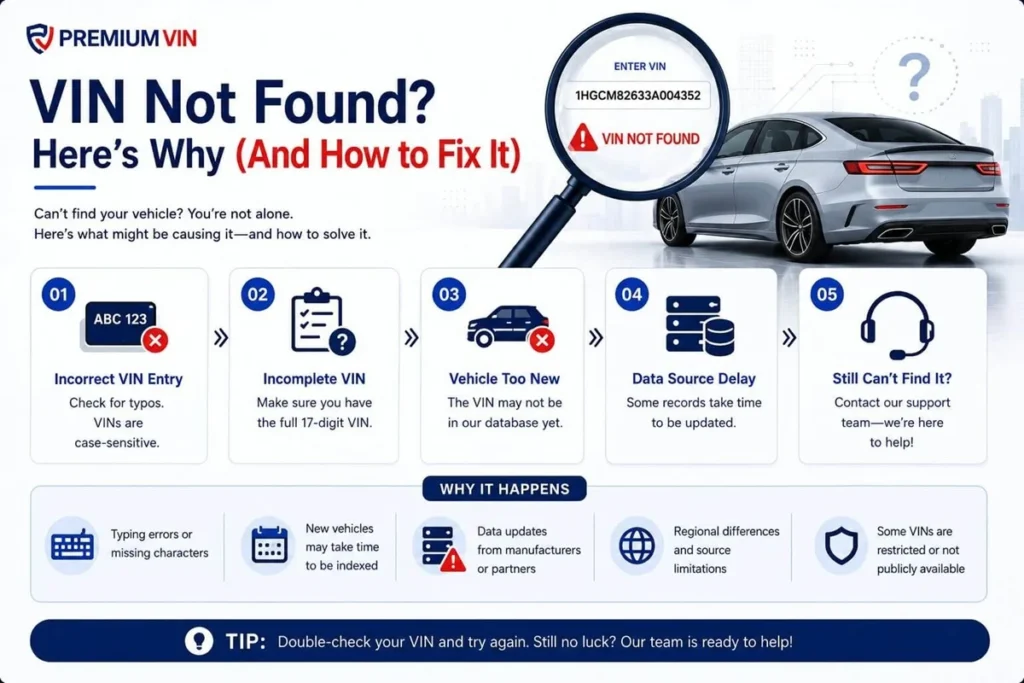
Most modern VIN decoders and vehicle history tools are built around the standardized 17-character VIN format. When a classic vehicle has a 10-, 12-, or 13-character VIN, many standard lookup tools cannot match it to their database.
Instead of identifying it as an older manufacturer-specific VIN, they may simply return a “VIN not found” or “invalid VIN” message. This does not always mean the VIN is incorrect; it only means the lookup tool was designed for a different VIN format.
How to Accurately Decode a Classic and Modern VIN
If you need a service to decode both classic and modern VINs without sending the “VIN Not Found” message, you can use the PremiumVIN service. Follow these simple steps to get it done in under a minute.
Step 1: Find the VIN
Check the driver’s side doorjamb, windshield, engine bay, or the vehicle’s paperwork like the title, registration, or bill of sale.
Step 2: Use PremiumVIN’s Service Accordingly
At PremiumVIN, we have two choices you can choose from to decode classic or modern VINs.
- Use Classic Car VIN Lookup to decode a classic car VIN (5- to 14-digit VIN)
- Use VIN Decoder to decode the modern 17-digit VIN format
Step 3: Enter the VIN
Once you have the VIN, click the form and enter the VIN you want to check. Then, click on the button to submit the VIN.
Step 4: Get Vehicle Specs Info
Once it is done, you can check the preview page to see the complete vehicle’s information on engine, body type, drive type, fuel type, origin, MSRP, and market value at no cost.
Real Case: Why do You Need to Use the Right Service to Decode a Classic VIN
Jan wanted to purchase a classic car from a unique car shop. The car is said to be a 1967 Pontiac Catalina. Before he decided to purchase the car, Jan decided to run a quick VIN decoder to make sure the car was legit.
Sample VIN: 252677X172255
The Outcome
Jan got so frustrated because the VIN lookup service kept sending him a “VIN Not Found” message, as some of the tools did not support decoding classic car VINs. Then, he found a classic VIN decoder, which is PremiumVIN.
The Result
Jan was relieved that he had found a proper tool to help him make sure the VIN is correct and to check the car’s specifications, market value, and MSRP at no cost. In addition, Jan can get a classic vehicle report to examine the car’s records.
Decode Your VIN with PremiumVIN, No “VIN Not Found” Guarantee
A “VIN not found” message does not always mean the vehicle cannot be identified. It may simply mean the VIN is too new, outside a database’s coverage, or uses an older format that standard tools cannot process.
PremiumVIN helps check both modern 17-character VINs and supported classic VIN formats, providing available vehicle details and specifications. Whether verifying a recent purchase or researching a classic vehicle, using the right VIN decoder can make all the difference.
FAQs on VIN Not Found
Why is it saying the VIN is not found?
A “VIN Not Found” message usually means the system cannot find a matching record for the vehicle’s 17-digit VIN. This can happen because of a typing mistake, such as confusing 0 with O, using an older VIN from before the 17-digit standard, or checking a newer vehicle that has not been added to the database yet.
What do I do if I can't find my VIN number?
If you cannot find your 17-digit VIN, start by checking your vehicle documents. The VIN is listed on your registration, insurance card, and title certificate. If you have access to the vehicle, check the driver’s side windshield area or the driver’s side door jamb for the VIN plate.
Where else can a VIN number be found?
In addition to the driver’s side dashboard, a Vehicle Identification Number (VIN) may also be found on the driver’s side door jamb, engine block, or vehicle frame. It is also printed on important documents, including the vehicle title, registration, and insurance policy.
Can I look up a VIN number online?
Yes, a VIN can be searched online to find vehicle specifications, recall information, and available history details. PremiumVIN’s VIN Lookup service helps identify vehicle details and provides additional information based on the available records.
How to verify VIN number?
To verify a Vehicle Identification Number (VIN), compare the 17-character code across multiple locations, including the windshield plate, driver’s door jamb, and other stamped areas on the vehicle. Then, check the VIN through trusted databases to confirm vehicle details, recalls, and possible record discrepancies.
How can I check if a VIN is valid?
To quickly check whether a 17-digit VIN is valid and identify the vehicle’s make and model, use PremiumVIN’s Free VIN Decoder & Lookup tool for fast vehicle information and specifications.