

Used cars, vehicles, trucks, motorcycles, and any used vehicle at a dealership could have a hidden defect or damage, and you just can’t be sure from its appearance. As a buyer, it is important to get the vehicle history report by using the VIN to do a quick and thorough background check at home.
If you plan to purchase a used RV, be it from a private seller or a dealership, do not forget to ask for the VIN and use PremiumVIN to get the full RV vehicle history report. Scroll through the article to learn the fastest way to receive the vehicle history report and what information is provided in the documentation.
Where to Find the VIN on an RV
An RV’s VIN location depends on the type, manufacturer, and model. You may find the VIN on the vehicle, a certification label, or the RV’s paperwork
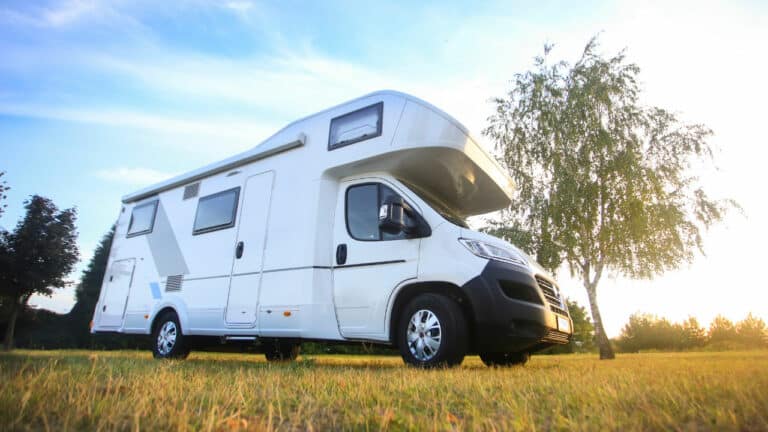
Class A, Class B, and Class C Motorhomes
The VIN is found on the dashboard near the driver’s side. If the VIN is not visible, you may check the paperwork.
Travel Trailers and Fifth Wheels
Check the trailer frame or tongue to find the VIN. In addition, the VIN can also be found on the kingpin area of a fifth wheel or on a manufacturer’s certification label.
Toy Haulers and Pop-Up Campers
Toy haulers and pop-up campers can also have the VIN stamped around the frame or tongue, or printed on a certification label.
Check the RV Paperwork
Once you find the VIN, compare it with paperwork like title, registration, and other vehicle documents. The VIN should match exactly, including letters and numbers. If there is one missing or incorrect digit, ask the seller about discrepancies.
How to Get an RV Vehicle History Report
You can use the RV’s VIN to get its vehicle history report by using PremiumVIN’s RV VIN lookup tool. Follow these simple steps to get it done within seconds.
Step 1: Enter the VIN
Click the form and enter the RV VIN you want to check. Then, click the button to submit the form.
Step 2: Get the RV Vehicle History Report
Check the preview page to see the vehicle’s basic information. Then, proceed to payment to get the full RV vehcile history report.
How to Read an RV VIN
The RV VIN has the same format as the other vehicle. On a 17-digit VIN, the VIN is classified into three categories:
- World Manufacturer Identifier: This section ranges from the first to third digits. It identifies the vehicle’s manufacturer location.
- Vehicle Descriptor Section: The next five characters describe the vehicle’s attributes like engine, trim, body type, and series code.
- Check Digit: Placed on the ninth digit of the VIN, made with a mathematical formula to ensure the VIN is correct.
- Vehicle Identifier Section: The final 10 to 17 digits of the VIN; this section shows the vehicle’s serial number, assembly plant code, and its model year.
Reading a VIN Manually
Do you know that you can decode the VIN manually by looking at the digits and interpreting them one by one? Take a look at the example below and see how to do it.
Sample VIN: 5VBABX5A2MA121581
WMI: Characters 1–3
- 5VB = Tiffin Motorhomes Inc. (United States)
VDS: Characters 4–8
- A: Model/series code (Allegro Red line)
- B: Body or chassis type
- X5: Trim or floorplan identifiers
- A: Engine or transmission details
Check Digit
- 2: Check digit
VIS: Characters 10–17
- 10th digit (M): Model year → 2021
- 11th digit (A): Plant code → Tiffin’s main manufacturing facility in Red Bay, Alabama.
- 12th–17th digits (121581): Production number
RV VIN vs. Data Plate vs. Serial Number vs. Model Number
An RV has several labels that look similar, but they have different purposes. Knowing the difference can help you identify the correct VIN and avoid using a serial or model number when checking the RV’s history.
VIN
The Vehicle Identification Number (VIN) is used as the RV’s unique identifier. The VIN identifies the specific vehicle and its serial number. You may use the VIN to run a VIN check and get a vehicle history report to see the vehicle’s past information.
Data Plate
On the other hand, a data plate (often called a certification label as well) also shows the vehicle’s crucial information. The data plate shows the RV’s VIN, Gross Vehicle Weight Rating (GVWR), and Gross Axle Weight Rating (GAWR).
Serial Number
A serial number is made specific to identify the RV’s coach, body, and other components, and this number is made specifically by each manufacturer. A serial number is not the same as a VIN and cannot be used to look up a vehicle’s records.
Model Number
The model number shows the RV’s specific model or configuration rather than the individual vehicle. Multiple RVs of the same model can have the same model number, while each vehicle has its own unique VIN.
Why RV VINs Can Be More Complicated Than Car VINs
In reality, RVs’ VINs use the same 17-character format as other modern motor vehicles, but identifying the correct VIN can be more complicated because of how recreational vehicles are built.
Motorhomes may involve separate chassis and coach manufacturers, while towable RVs have different VIN locations and identification labels.
Motorhomes Can Have a Chassis and Coach Manufacturer
A motorhome could be built in two stages, with one manufacturer producing the chassis, while another completes the coach or living area. For example, one manufacturer produces the chassis, while another makes the coach or living area. A motorhome may use a chassis from a major vehicle manufacturer and then be finished by an RV manufacturer.
Because of this, you may find a chassis VIN along with a separate coach serial number or manufacturer identifier. The chassis VIN identifies the underlying vehicle, while the coach identifier may relate to the RV body and its manufacturer records.
Towable RVs Have Different VIN Locations
Travel trailers, fifth wheels, toy haulers, and pop-up campers are not built on a motorhome chassis, so their VINs are typically found in different places. Common locations include
Travel trailers, fifth wheels, toy haulers, and pop-up campers are not built on a motorhome chassis, so their VINs are found in different places. You can find them in the trailer frame, tongue, certification label, or vehicle paperwork.
What Can an RV Vehicle History Report Show?
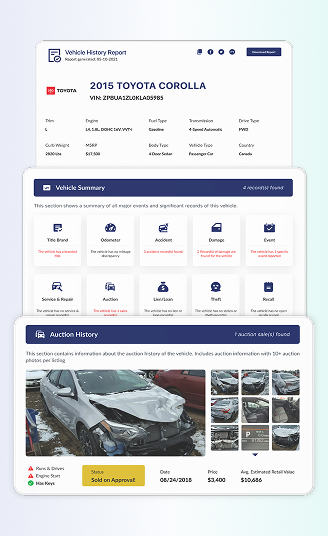
AN RV vehicle history report shows all the complete information you need to know before purchasing a used RV. With a vehicle history report, you can now check the RV’s records, such as auction, accident, title check, and more.
Auction History
You can check whether the RV has previously been sold through an auction. This section shows the auction date, location, and final sale price, and includes up to 10 auction photos showing the RV’s condition at the time of sale.
Mileage Records
Review the recorded mileage readings and the last known mileage before the RV was put up for sale. Make sure you didn’t find any sign of odometer rollback in the report; if so, find another listing.
Ownership Records
Check the RV’s ownership history with the record. You will find the chronological data of each owner, like the year of purchase and ownership duration, and registration location. Note that names, addresses, and contact information are not shown.
Title Brand Check
You should check if the RV carries brands such as salvage, rebuilt, lemon, odometer, or flood. A branded title can affect the RV’s value, insurability, and registration requirements.
Vehicle Usage Records
See if the vehicle was used privately, rented, leased, by police, or by a government organization. Previous use can provide more context when evaluating the RV’s history.
Accident Records
Check previous accidents involving the RV. These records include the date, location, and number of reported accidents. Make sure the RV has never been involved in an accident.
Damage Verification
Review damage records for events such as major or minor accident damage, flood damage, natural disasters, salvage activity, or fire damage. These records can help identify previous damage that may not be obvious during a visual inspection.
Lien/Loan Records
If a lien is shown, you can see the date and location where it took place. Before proceeding to purchase, check this section carefully so you do not end up paying someone else’s responsibility.
Event Verification
Review more events associated with the RV. This section includes abandonment, repossession, duplicate title issuance, or an insurance loss.
Warranty Records
See if the RV is still covered by warranties. With a report, you can see if it is still covered under manufacturer warranty, roadside assistance, or even an extended warranty. Aside from that, you can also check its mileage and months of validity.
Service and Maintenance Records
Check the full RV’s service and maintenance records. In the report, you can find the chronological order with the date, location, and what components were fixed or changed.
What Information Might Not Be Included in the RV Vehicle History Report
An RV vehicle history report shows records that are linked to the vehicle, but it cannot replace a physical inspection. Many problems were never reported; hence, plenty of issues could develop over time and be discovered during a physical inspection.
Water Damage and Delamination
A vehicle history report could reveal every roof leak, failed seal, moisture problem, or delamination issue. You may run an offline inspection to inspect the roof, walls, windows, seals, and other areas to see if it has signs of water intrusion, soft spots, bubbling, staining, or other physical damage.
Appliances and RV Systems
Checking a vehicle history report alone cannot confirm if the RV’s appliances and systems are working properly. You need to test the equipment such as the refrigerator, air conditioning, generator, plumbing, electrical system, water heater, slides, and others.
Mechanical and Physical Condition
The report cannot confirm the RV’s current mechanical or physical condition. Inspect the engine, transmission, brakes, suspension, tires, roof, frame, interior, and other components separately to identify wear, defects, or damage that may not appear in historical records.
Towable RV Record Gaps
History coverage can vary for travel trailers, fifth wheels, toy haulers, and other towable RVs. A lack of records does not necessarily mean the RV has never been damaged or had mechanical, structural, or water-related problems. Inspect the RV and verify its documentation before completing the purchase.
RV Pre-Purchase Checklist
Before buying a used RV, verify its identity, review its available history records, and inspect its condition. Use this checklist to cover the main areas before agreeing to the purchase.
Verify the RV’s Identity
- Match the VIN on the RV to the title and registration.
- Confirm the chassis VIN and coach identifiers, where applicable.
- Decode the VIN to verify the basic vehicle information.
Review the RV’s History
- Get RV history records by using the VIN
- See if it has title, accident, and damage records.
- Review recorded mileage and ownership history.
- Check for theft, lien, auction, and recall records where available.
- Compare the report with the seller’s description and supporting documents.
Inspect the RV
- Check the chassis, engine, transmission, brakes, suspension, and tires, where applicable.
- Inspect the roof, seals, walls, and floors for damage.
- Look for signs of water intrusion, moisture, and delamination.
- Test the appliances, electrical and plumbing systems, generator, heating and air conditioning, and slide-outs, where fitted.
- Arrange an inspection by a qualified RV technician before completing the purchase, if possible.
Examining RV Made Easy With Vehicle History Report
Before buying a used RV, check its VIN, review the vehicle history report, and inspect the condition carefully. An RV vehicle history report helps you identify potential issues that appear on the vehicle.
However, a vehicle history report alone cannot reveal all the problems the RV has endured in the past, as some of them were not reported or fixed thoroughly. Combining a vehicle inspection with a vehicle report is the best way to know the RV’s actual condition.
FAQs on RV Vehicle History Report
What does "RV" mean in vehicle history?
RV stands for recreational vehicle. It refers to vehicles designed for travel, camping, or temporary living, including motorhomes, travel trailers, fifth wheels, and toy haulers.
What is an RV VIN?
An RV VIN (Vehicle Identification Number) is a unique 17-character code used to identify most modern road vehicles, including motorhomes and many towable RVs
Where is the RV data plate?
The RV data plate or certification label is commonly found on an interior cabinet, near the driver’s seat, inside a storage compartment, or on the vehicle’s exterior, depending on the RV type and manufacturer. It may display the VIN, weight ratings, and other vehicle specifications.
Where is the RV model number?
The RV model number is usually written on the manufacturer’s identification label, inside a cabinet, near the entry door, or in the owner’s manual. You may also find it on the sales paperwork. Its location varies by manufacturer and model.
How do I check an RV's history by VIN?
To check the RV history by VIN, you can start by finding the VIN first. Then, enter it into an RV lookup tool like PremiumVIN, then enter the VIN on the form and submit it once the details are filled. You can then get the vehicle history report and review the records for title brands, mileage, accidents, damage, auction activity, and other reported events.
Can I check an RV's history for free?
Yes. You can decode an RV’s VIN for basic vehicle information using a free VIN decoder. However, you will only get the basic information like engine, transmission, trim, year, model, market value, and MSRP.
Does an RV history report show water damage?
Yes. PremiumVIN’s RV report recorded flood or water-related damage, but it cannot identify every leak, seal failure, or moisture problem. Consider a professional inspection to check roof, walls, floors, and seals for signs of water intrusion.
Can two RVs have the same VIN?
No. Each RV should have a different and unique VIN. If two RVs has the same VIN, or the VIN on an RV does not match its paperwork, verify the identifiers and documentation before proceeding with the purchase.