

- A VIN can show factory specifications, including the trim level, engine, transmission, drivetrain, body style, and model year.
- Looking up vehicle specs by VIN helps buyers verify listings and avoid incorrectly advertised vehicles.
- Sellers can use a VIN decoder to create accurate listings and reduce the risk of misrepresentation.
- A free VIN lookup through PremiumVIN provides quick access to vehicle specifications, helping users make informed decisions.
Two vehicles might look the same but have completely different specifications due to many factors. However, one may be equipped with a fuel-efficient four-cylinder engine with front-wheel drive, while the other could be equipped with a more powerful V6 and all-wheel drive. The difference cannot be overstated by checking the physical condition, but you can check the complete vehicle specs by VIN number.
A Vehicle Identification Number (VIN) can reveal a vehicle’s complete information by simply decoding it through a trusted VIN decoder service. In this article, we’ll guide you through the steps of decoding a VIN number from any vehicle to check its full specifications and get more information in under a minute.
What Vehicle Specifications Are Encoded in a VIN?
A VIN does not store vehicle specifications like a database. Instead, each VIN character follows a globally standardized structure that points to the vehicle’s original factory build. When the VIN is correctly decoded, the VIN will show the complete specification and the market value.
Here’s the vehicle specification information you’ll get right after decoding the VIN.
Factory Specifications
Once the VIN is decoded, it will show the complete vehicle specification. Examining the vehicle specification is important before selling or purchasing a used vehicle.
Make, Model, and Model Year
Knowing the vehicle’s model year is important because it does not always match the calendar year when the vehicle was sold. For example, a vehicle built in late 2022 may be classified as a 2023 model.
Trim Level and Series
You can decode the VIN and check the vehicle’s trim level and series information. Even though the vehicle has the same year, make, and model, the assigned trim can be different. If the trim level differs, the specifications and MSRP are also different.
Body Style and Configuration
These records can confirm whether a vehicle was built as a sedan, coupe, SUV, wagon, convertible, crew cab, or extended cab. It might seem like a small detail, but it can make a big difference when comparing two vehicles. For example, a Ford F-150 SuperCrew and a Regular Cab F-150 serve different purposes despite belonging to the same model range.
Engine Type and Displacement
One of the most important pieces of information you can get from our free VIN decoder tool is the engine type information. Here, you’ll be getting the engine type and engine capacity.
Knowing the engine details matters because many modern vehicles offer several engine options within the same model range.
Drivetrain and Transmission
Many manufacturers’ build records also include drivetrain and transmission information.
Our VIN decoder can show whether the vehicle was built with front-wheel drive, rear-wheel drive, all-wheel drive, or four-wheel drive and the transmission type, whether it is a manual or automatic transmission.
Manufacturer Plant
Our VIN decoder tools also show where the vehicle was manufactured. Different assembly plants may use different supplier networks or production processes. In some cases, recalls and service campaigns apply only to vehicles built at specific facilities during a certain production period.
MSRP
MSRP stands for Manufacturer’s Suggested Retail Price, which means the retail price set by manufacturers, and this does not include dealer fees or transportation costs. You can also check the vehicle’s MSRP with our VIN decoder.
Market Value
Not only does the PremiumVIN VIN Decoder show vehicle specifications, but it also shows the recent market value. This section highlights the price according to the vehicle’s condition, such as outstanding, clean, average, and rough, in private-seller and dealer settings.
What Information Cannot be Obtained from a VIN Decoder?
While a VIN decoder can reveal detailed vehicle specifications, it does have a limitation. By decoding the VIN, you can see how the vehicle left the assembly line, but not how it exists today.
Aftermarket Modification
Aftermarket upgrades and customisations do not alter the VIN record. Items such as larger wheels, body kits, suspension upgrades, remote start systems, performance parts, or premium audio equipment are not shown when decoding the VIN.
Dealer-Installed Options
Not every feature found on a vehicle was installed at the factory. Some options are added by dealerships after the vehicle arrives on the lot, which means they do not appear in the original build data.
Post-Sale Changes
Major changes made after the vehicle is sold also do not affect the records. Engine swaps, transmission replacements, performance upgrades, and other significant modifications can alter the vehicle without changing its original vehicle information.
How to Look Up Vehicle Specs by VIN?
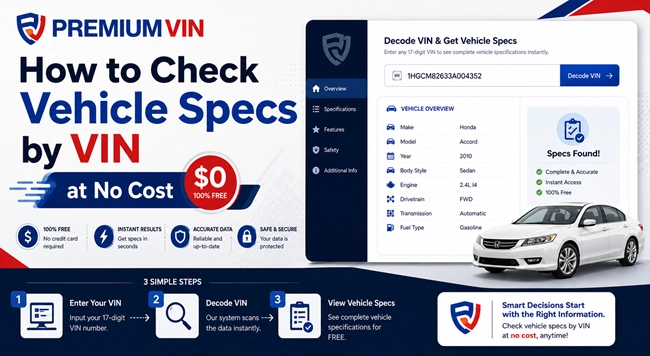
To check vehicle specifications by VIN for free, you can use our VIN decoder service and get the information in under a minute. Follow these simple steps:
Step 1: Find the VIN
Step 2: Enter the VIN
Open PremiumVIN’s VIN Decoder tool and enter the VIN into the form. After that, click on the button to submit the form.
Step 3: Check Vehicle Specifications
See the complete vehicle specification, like engine, trim, drive type, country of origin, and the updated market value.
Why Looking Up Vehicle Specs by VIN Matters
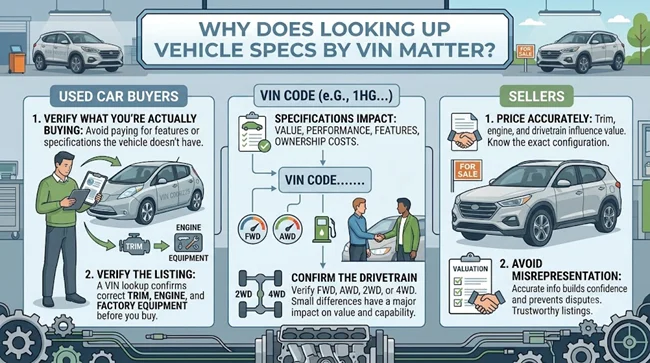
Knowing a vehicle’s exact factory specifications helps buyers and sellers make informed decisions. Small differences in trim, engine, or drivetrain can significantly affect value, features, and ownership costs.
Used Car Buyers
A VIN lookup helps buyers verify what they’re actually purchasing, reducing the risk of overpaying for a vehicle that doesn’t match its advertised specifications.
Verifying What the Listing Claims
Online listings often contain errors or missing information. A 2020 Honda CR-V advertised as an EX-L may decode as a lower LX trim; you potentially could save thousands of dollars.
Confirming Drivetrain Before Buying
AWD and 4WD models typically carry higher values than their 2WD counterparts. A VIN lookup verifies the original drivetrain before any money changes hands.
A quick check can prevent costly mistakes when comparing similar-looking vehicles with very different capabilities and resale values.
Sellers
Looking up vehicle specifications before listing helps owners accurately describe their vehicle, set realistic prices, and avoid disputes with potential buyers.
Pricing Accurately
Avoiding Misrepresentation
Incorrect specifications can create confusion and damage a reputation. If you are a seller, always decode the VIN and get the correct vehicle specifications information to avoid misrepresentation in the listing description.
REAL CASE: Why Checking Vehicle Specifications is Important?
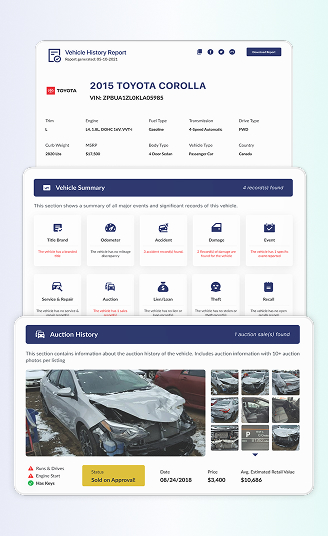
Billy wanted to sell her 2015 Toyota Corolla, which had been gifted to her years earlier. Since she did not know its exact specifications, she decided to check the car specs by VIN and discovered it was an L trim with a 1.8L engine, manual transmission, and FWD.
Why is Checking Specifications by VIN Important for a Seller?
Sellers are responsible for showing accurate listing information. Listing the wrong trim, engine, transmission, or drivetrain can mislead buyers and create unnecessary disputes during the sale process.
VIN Structure
A VIN is divided into three different parts that show different vehicle information. Here’s how the VIN is classified:
- World Manufacturer Identifier (WMI): The first section of the VIN identifies the vehicle manufacturer and country of origin. It confirms who built the vehicle and where production took place.
- Vehicle Descriptor Section (VDS): The fourth to ninth digits contain information about the vehicle’s key specifications, such as the model, body style, trim level, engine, and other factory-installed characteristics.
- Vehicle Identifier Section (VIS): This part is located in the tenth to seventeenth includes the model year, assembly plant, and a serial number that distinguishes it from every other vehicle produced.
How is a VIN Broken Down
Take a look at the example below to see how a VIN is deciphered one by one.
Sample VIN: 19VDE1F31FE006117
WMI (World Manufacturer Identifier)
Digit 1-3: 19V
1 = United States
9V = Acura (Honda/Acura manufacturing)
VDS (Vehicle Descriptor Section)
Digits 4–9: DE1F31
- D = Model line (Acura ILX)
- E = Body Style (Sedan)
- 1 = Engine Type (2.0L inline-4)
- F = Restraint System/Transmission (Automatic, with airbags and ABS)
- 3 = Trim Level or Series
- 1 = Check digit
VIS (Vehicle Identifier Section)
Digits 10–17: FE006117
F = Model year (2015)
E = Assembly plant in Marysville, Ohio, USA
006117 = Serial number
Conclusion on Checking Specs by VIN
Vehicle specifications affect everything from a car’s value and performance to its safety features and maintenance requirements. Rather than relying on badges, listings, or a mere assumption, looking up a vehicle specification by VIN is the best way to get the correct information.
Whether you’re buying, selling, insuring, or simply researching a vehicle, checking the specs first can help you make better decisions and avoid costly mistakes. Use PremiumVIN’s free VIN decoder to access vehicle specifications, market value, and MSRP. Verify exactly what a vehicle was built with before you purchase it or put the vehicle on sale.
FAQs on Vehicle Specs by VIN
Can you check the vehicle specifications through the license plate?
Yes, you can check the vehicle specifications through the license plate. You can use our license plate number to check the complete vehicle’s specifications with our service.
Can you get the specs for a car with the VIN number?
Yes, you can get the specs for a car with the VIN number. A vehicle’s VIN can be used to identify its original factory specifications, including the engine, transmission, trim level, body style, and other key details.
How to check car specs for free?
To check vehicle specifications for free, enter the 17-digit VIN, or in some cases the license plate number, into a trusted VIN decoder tool. The tool can help you get information such as the year, make, model, engine, trim, and factory-installed equipment.
Can my VIN tell me my engine size?
Yes, a VIN can help identify your vehicle’s engine size and configuration. By decoding the VIN, you can verify the engine that was originally installed by the manufacturer, including its displacement and fuel type.
What information does a VIN provide?
How to look up car details by VIN for free?
To look up a car detail by VIN, you can use PremiumVIN’s free VIN decoders to look up a vehicle’s specifications in seconds. A VIN decoder can check details such as the model year, trim level, engine type, drivetrain, and manufacturing plant. In addition to that, you can also get the detailed market value of the vehicle.