
AM General Window Sticker Lookup: Get Your Original Specs by VIN
If you want to uncover your AM General vehicle’s original features, pricing, and equipment, using an AM General window sticker by VIN is the most reliable way. This official label provides comprehensive details about the vehicle, exactly as it left the factory, enabling buyers, sellers, dealers, and enthusiasts to make informed decisions.
What Is an AM General Window Sticker by VIN?
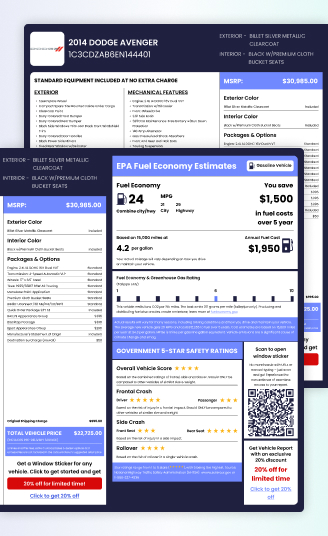
An AM General window sticker is a factory-generated document that outlines the original specifications of an AM General vehicle based on its unique Vehicle Identification Number. It includes the vehicle’s standard features, optional packages, engine details, MSRP, safety ratings, and more.
By entering a VIN into our AM General window sticker lookup tool, you can retrieve a digital copy of the original sticker.
Information You Can Find on an AM General Window Sticker
When you perform an AM General window sticker lookup, you receive a wealth of detailed factory data. Here is a breakdown of the key information on the label:
Vehicle Description
This section includes basic identification details, such as the model year, make, model, trim level, as well as the exterior and interior color names. It also clearly displays the unique 17-digit VIN.
Standard Equipment
A comprehensive list of features that were included as part of the vehicle’s base price for that specific trim level. These are typically grouped into categories like Mechanical/Performance, Interior, Exterior, and Safety/Security.
Warranty Information
Details on the manufacturer’s warranty coverage, including the duration (in years/miles) of the basic (bumper-to-bumper) warranty, powertrain warranty, corrosion, and roadside assistance warranties. For instance, a five-year/100,000-mile powertrain warranty covers engine and transmission repairs for five years or up to 100,000 miles, whichever comes first.
Manufacturer’s Suggested Retail Price
The MSRP, or Manufacturer’s Suggested Retail Price, is the base price of the vehicle, which includes the standard equipment before any optional features, packages, or fees are added. It is the starting point for calculating the vehicle’s total original price.
Optional Equipment
This critical section lists every factory-installed option, package, and accessory not included in the base price, along with the original retail price for each. These costly additions are often what significantly increase the value of a pre-owned Audi.
Destination Charge
This is the fee charged by the manufacturer to transport the vehicle from the factory to the dealership. It is a fixed, non-negotiable charge.
Total Price
The final original sticker price of the vehicle. This is calculated by adding the Manufacturer’s Suggested Retail Price (MSRP), all Optional Equipment costs, and the Destination Charge.
Fuel Economy / EPA Label
This section provides estimates of the vehicle’s fuel efficiency. It displays the EPA’s ratings for combined city/highway driving in miles per gallon (mpg). Adjacent to this is an estimate of how much you’ll save or spend on fuel over five years.
Below, you’ll find the estimated annual fuel costs along with fuel economy and greenhouse gas emission ratings—each scored on a scale from 1 to 10, with 10 representing the highest efficiency.
Figures used to calculate fuel costs are also shown, along with a reminder that actual mileage may vary.
Safety Ratings
The NHTSA tests new vehicles annually for frontal, side, and rollover protection, assigning star ratings on a five-star scale, with five stars being the highest. Not all vehicles are tested, so this section may occasionally be blank. In such cases, consumers can refer to the IIHS website for additional safety information.
Why AM General Window Stickers Matter
AM General vehicles, particularly the civilian Hummer H1, are highly sought-after collector items with unique specifications. The window sticker is essential for verifying the exact factory configuration of your vehicle.
Verify Military vs. Civilian Configuration
Confirm whether the vehicle is a civilian Hummer H1 or a military-spec HMMWV, as the equipment and specifications differ significantly.
Confirm Engine and Drivetrain
Identify the original engine (e.g., 6.2L or 6.5L diesel V8) and drivetrain configuration, which are critical for authenticity and value.
Validate Optional Equipment
Ensure that factory-installed options like the winch, brush guard, heavy-duty cooling system, or off-road lighting were original, not added aftermarket.
Understand Original MSRP
Evaluate the vehicle’s original price, which is crucial for understanding depreciation and current market value.
Why Do You Need an AM General Window Sticker?
The information contained in a vehicle’s original Monroney label is crucial for all parties involved in an AM General’s lifecycle.
Buyers
Car and truck buyers can use the sticker to confirm factory-installed features, evaluate value, compare models, and avoid vehicles with missing or altered equipment.
Sellers
Sellers can improve buyer trust by providing a verified document that details original pricing, standard equipment, and options. It helps justify the asking price.
Dealers
Dealers benefit from instant, accurate vehicle data to support transparent sales, accurate appraisals, and high-quality customer experiences.
How to Get the Original AM General Window Sticker by VIN?
Obtaining your AM General’s Monroney label is quick and secure. Here’s how:
Enter the VIN
Locate and input your 17-digit AM General VIN into the form. This unique identifier ensures precise results.
Submit Your Request
Click the “Get a Window Sticker” button to preview your sticker.
Receive Your Sticker
Complete the payment process to download or print your window sticker.
Save, Print, or Share
Use your digital sticker for personal records, resale listings, or dealership documentation.
Where to Find Your AM General VIN?
To find your VIN, check these common areas:
Dashboard (Driver Side):
On the driver’s side, visible through the windshield.
Driver’s Side Door Jamb:
On a sticker or plate located when you open the driver’s door.
Vehicle Documents:
The VIN is usually listed on the vehicle’s title, insurance card, or registration documents.
Why Do You Need to Use Our AM General Window Sticker Lookup Tool?
Our AM General window sticker lookup tool is designed to provide detailed and accurate factory information with speed and reliability.
Fast: Get instant access to your vehicle’s factory data. Simply enter your VIN and retrieve your original Monroney label quickly, without waiting for manual processing.
Accurate: Our system pulls data directly from comprehensive databases to ensure the details reflect the exact way your AM General left the assembly line.
Helpful: The easy-to-read, Monroney-style format clearly outlines standard features, optional packages, and original pricing, making it simple to compare and verify.
Expert Support: Our team is available to assist you with any questions about your AM General’s sticker details.
Popular AM General Models Supported
Our AM General window sticker lookup supports a range of models, including:
Hummer H1
Hummer H2
Hummer H3
HMMWV
M998 Series
M1025
M1026
M1035
M151
M35
M809 Series
M939 Series
Get Your AM General’s Original Window Sticker Today
Stop guessing about your vehicle’s true factory configuration. Use the definitive AM General window sticker by VIN tool to instantly access the official features, options, and pricing for your AM General vehicle.
FAQs About AM General Window Sticker Lookup by VIN
What specific details are listed on an AM General Hummer H1 window sticker?
On a civilian Hummer H1, the window sticker provides a detailed snapshot of the vehicle’s specifications and pricing. It typically lists the Manufacturer’s Suggested Retail Price (MSRP), outlines the standard equipment included at no extra cost, and highlights any optional equipment along with the total calculated price. You’ll also find engine and transmission specifications, as well as official fuel economy ratings for both city and highway driving.
How can I get a copy of the original AM General window sticker for a used Hummer H1?
Since AM General no longer produces the Hummer H1, obtaining an official, certified reprint of the original Monroney sticker can be challenging, but it is possible:
Premium VIN lookup tool: You can retrieve a digital copy of the original sticker through specialized third-party services, such as Premium VIN.
Original Dealership/Seller: If the used H1 was purchased from a dealer, they may have kept a copy in the historical file. If you know the original selling dealer, you can contact their parts or service department.
AM General Archives: While not always publicly accessible, sometimes a letter to the manufacturer’s archives with the VIN can yield results for highly sought-after collector vehicles. The VIN is the key piece of information needed for any successful search.